Linux用户管理

越是不想开始,越是需求开始。前两周刚学过一遍,不过又变得模糊。

Linux是一个多用户多任务的操作系统,用户管理很有必要。

一、用户组

1.1 添加用户组

  1. 添加用户组
1
groupadd 组名
1
2
3
[root@centos7 ~]# groupadd IT
[root@centos7 ~]# tail -n1 /etc/group
IT:x:1002:
  1. 添加用户组时指定 gid
1
groupadd -g 指定的gid 组名
1
2
3
4
5
6
[root@centos7 ~]# groupadd OPS -g 3000
[root@centos7 ~]# groupadd -g 2000 HR
[root@centos7 ~]# tail -n2 /etc/group
OPS:x:3000:
HR:x:2000:
[root@centos7 ~]#

1.2 删除用户组

  1. 删除用户组
1
groupdel 组名

作为用户主组的组,不可以被删除。除非使用 -f 参数强制删除。

1
2
3
4
5
6
7
8
9
10
11
12
13
14
15
16
17
18
19
20
21
22
23
24
25
26
# 创建两个测试组,用于测试删除
[root@centos7 ~]# groupadd test1
[root@centos7 ~]# groupadd test2
[root@centos7 ~]# tail -n2 /etc/group
test1:x:3001:
test2:x:3002:

# 证明作为用户主组的qiankong组存在
[root@centos7 ~]# cat /etc/group |grep qiankong
wheel:x:10:qiankong,yangge
qiankong:x:1000:qiankong
[root@centos7 ~]#

# 删除测试组,并验证
[root@centos7 ~]# groupdel test1
[root@centos7 ~]# groupdel test2
[root@centos7 ~]# cat /etc/group |grep test
[root@centos7 ~]#

# 删除 作为用户主组的qiankong组,删除失败
[root@centos7 ~]# groupdel qiankong
groupdel: cannot remove the primary group of user 'qiankong'
[root@centos7 ~]# cat /etc/group |grep qiankong
wheel:x:10:qiankong,yangge
qiankong:x:1000:qiankong
[root@centos7 ~]#
  1. 强制删除作为用户主组的组
1
2
3
4
5
6
7
8
9
10
11
12
13
14
15
16
17
18
19
20
21
22
23
# 证明作为用户主组的qiankong组存在
[root@centos7 ~]# cat /etc/group |grep qiankong
wheel:x:10:qiankong,yangge
qiankong:x:1000:qiankong

# 强制删除
[root@centos7 ~]# groupdel -f qiankong
[root@centos7 ~]# cat /etc/group |grep qiankong
wheel:x:10:qiankong,yangge
[root@centos7 ~]#

# 删除后用户查到的主组为gid,是一个数字
[qiankong@centos7 ~]$ id
uid=1000(qiankong) gid=1000 groups=1000,10(wheel)
[qiankong@centos7 ~]$

# 重新添加回来后
[root@centos7 ~]# groupadd qiankong -g 1000
[root@centos7 ~]#

[qiankong@centos7 ~]$ id
uid=1000(qiankong) gid=1000(qiankong) groups=1000(qiankong),10(wheel)
[qiankong@centos7 ~]$

1.3 修改用户组(gid、组名)

1
2
groupmod -g 指定的gid 组名
groupmod -n 新的组名 组名
1
2
3
4
5
6
7
8
9
10
11
12
13
14
15
16
17
18
19
20
21
22
23
24
25
26
27
28
29
# 修改组名
## 一次修改组名 IT ---> ITTI
[root@centos7 ~]# cat /etc/group |grep IT
IT:x:1002:
[root@centos7 ~]# groupmod -n ITTI IT
[root@centos7 ~]# cat /etc/group |grep IT
ITTI:x:1002:
[root@centos7 ~]#

## 二次修改组名 ITTI ---> IT
[root@centos7 ~]# groupmod ITTI -n IT
[root@centos7 ~]# cat /etc/group |grep IT
IT:x:1002:
[root@centos7 ~]#

# 修改组gid
# 一次修改组gid 3000-->4000
[root@centos7 ~]# cat /etc/group |grep OPS
OPS:x:3000:
[root@centos7 ~]# groupmod -g 4000 OPS
[root@centos7 ~]# cat /etc/group |grep OPS
OPS:x:4000:
[root@centos7 ~]#

## 二次修改组gid 4000-->3000
[root@centos7 ~]# groupmod OPS -g 3000
[root@centos7 ~]# cat /etc/group |grep OPS
OPS:x:3000:
[root@centos7 ~]#

1.4 查找组信息查看所有的组

1
2
3
4
5
6
7
8
9
10
11
12
13
14
15
16
17
18
19
20
21
22
23
24
25
26
27
28
29
30
31
32
33
34
35
36
37
38
39
40
41
42
43
44
45
46
47
[root@centos7 ~]# cat /etc/group
root:x:0:
bin:x:1:
daemon:x:2:
sys:x:3:
adm:x:4:
tty:x:5:
disk:x:6:
lp:x:7:
mem:x:8:
kmem:x:9:
wheel:x:10:qiankong,yangge
cdrom:x:11:
mail:x:12:postfix
man:x:15:
dialout:x:18:
floppy:x:19:
games:x:20:
tape:x:33:
video:x:39:
ftp:x:50:
lock:x:54:
audio:x:63:
nobody:x:99:
users:x:100:
utmp:x:22:
utempter:x:35:
input:x:999:
systemd-journal:x:190:
systemd-network:x:192:
dbus:x:81:
polkitd:x:998:
ssh_keys:x:997:
sshd:x:74:
postdrop:x:90:
postfix:x:89:
yangge:x:1001:
rpc:x:32:
rpcuser:x:29:
nfsnobody:x:65534:
apache:x:48:
slocate:x:21:
OPS:x:3000:
HR:x:2000:
qiankong:x:1000:
IT:x:1002:
[root@centos7 ~]#
  1. 查看某个组下的组成员
1
getent group 组名
1
2
3
[root@centos7 ~]# getent group wheel
wheel:x:10:qiankong,yangge
[root@centos7 ~]#

二、用户

2.1 添加用户

  1. 添加用户
1
useradd 用户名
1
2
3
4
5
6
7
# 添加用户 test001
[root@centos7 ~]# useradd test001
[root@centos7 ~]# id test001
uid=1002(test001) gid=3001(test001) groups=3001(test001)
[root@centos7 ~]# ls -la /home/ |grep test
drwx------ 2 test001 test001 62 Oct 6 13:26 test001
[root@centos7 ~]#
  1. 添加用户,指定 uid
1
2
useradd 用户名 -u 指定的uid
useradd -u 指定的uid 用户名
1
2
3
4
5
6
7
8
9
10
11
# 添加用户test002 ,指定uid为1005
[root@centos7 ~]# useradd test002 -u 1005
[root@centos7 ~]# id test002
uid=1005(test002) gid=1005(test002) groups=1005(test002)
[root@centos7 ~]#

# 添加用户test003 ,指定uid为1010
[root@centos7 ~]# useradd -u 1010 test003
[root@centos7 ~]# id test003
uid=1010(test003) gid=1010(test003) groups=1010(test003)
[root@centos7 ~]#
  1. 添加用户,指定家目录
1
2
useradd 用户名 -d 指定的家目录
useradd -d 指定的家目录 用户名
1
2
3
4
5
6
7
8
9
10
11
# 添加用户test004,指定家目录
[root@centos7 ~]# useradd test004 -d /opt/test004
[root@centos7 ~]# ls -ld /opt/test004/
drwx------ 2 test004 test004 62 Oct 6 13:33 /opt/test004/
[root@centos7 ~]#

# 添加用户test005,指定家目录
[root@centos7 ~]# useradd -d /opt/test005 test005
[root@centos7 ~]# ls -ld /opt/test005
drwx------ 2 test005 test005 62 Oct 6 13:33 /opt/test005
[root@centos7 ~]#
  1. 添加用户,指定用户的主组。 指定组必须存在。
1
2
useradd 用户名 -g 组名
useradd -g 组名 用户名
1
2
3
4
5
6
7
8
9
10
11
12
13
14
15
# 添加用户test006,指定主组为test666
[root@centos7 ~]# useradd test006 -g test666
useradd: group 'test666' does not exist

# 添加用户test006,指定主组为IT
[root@centos7 ~]# useradd test006 -g IT
[root@centos7 ~]# id test006
uid=1013(test006) gid=1002(IT) groups=1002(IT)
[root@centos7 ~]#

# 添加用户test007,指定主组为OPS
[root@centos7 ~]# useradd -g OPS test007
[root@centos7 ~]# id test007
uid=1014(test007) gid=3000(OPS) groups=3000(OPS)
[root@centos7 ~]#
  1. 添加用户,指定用户的附加组
1
2
useradd 用户名 -G 组名
useradd -G 组名 用户名
1
2
3
4
5
6
7
8
9
10
11
# 添加用户,指定附加组
[root@centos7 ~]# useradd test008 -G IT
[root@centos7 ~]# id test008
uid=1015(test008) gid=1015(test008) groups=1015(test008),1002(IT)
[root@centos7 ~]#

# 添加用户,指定附加组
[root@centos7 ~]# useradd -G OPS test009
[root@centos7 ~]# id test009
uid=1016(test009) gid=1016(test009) groups=1016(test009),3000(OPS)
[root@centos7 ~]#

2.2 删除用户

  1. 删除用户
1
userdel 用户名
1
2
3
4
5
6
7
8
9
10
11
12
13
14
15
16
17
18
[root@centos7 ~]# cat /etc/passwd |grep test
test002:x:1005:1005::/home/test002:/bin/bash
test003:x:1010:1010::/home/test003:/bin/bash
test004:x:1011:1011::/opt/test004:/bin/bash
test005:x:1012:1012::/opt/test005:/bin/bash
test006:x:1013:1002::/home/test006:/bin/bash
test007:x:1014:3000::/home/test007:/bin/bash
test008:x:1015:1015::/home/test008:/bin/bash
test009:x:1016:1016::/home/test009:/bin/bash
[root@centos7 ~]#

# 删除用户test002,发现家目录还在
[root@centos7 ~]# userdel test002
[root@centos7 ~]# id test002
id: test002: no such user
[root@centos7 ~]# ls -ld /home/test002
drwx------ 2 1005 1005 62 Oct 6 13:28 /home/test002
[root@centos7 ~]#
  1. 删除用户,同时删除家目录、邮箱目录
1
userdel -r 用户名
1
2
3
4
5
6
7
8
9
10
11
12
13
14
15
16
17
[root@centos7 ~]# cat /etc/passwd |grep test
test003:x:1010:1010::/home/test003:/bin/bash
test004:x:1011:1011::/opt/test004:/bin/bash
test005:x:1012:1012::/opt/test005:/bin/bash
test006:x:1013:1002::/home/test006:/bin/bash
test007:x:1014:3000::/home/test007:/bin/bash
test008:x:1015:1015::/home/test008:/bin/bash
test009:x:1016:1016::/home/test009:/bin/bash
[root@centos7 ~]#

# 删除用户,发现家目录不在了
[root@centos7 ~]# userdel -r test003
[root@centos7 ~]# ls -ld /home/test003
ls: cannot access /home/test003: No such file or directory
[root@centos7 ~]# id test003
id: test003: no such user
[root@centos7 ~]#

2.3 修改用户

  1. 修改用户的 uid
1
2
usermod -u 新的uid 用户
usermod 用户 -u 新的uid
1
2
3
4
5
6
7
8
9
10
11
12
13
14
15
[root@centos7 ~]# id test004
uid=1011(test004) gid=1011(test004) groups=1011(test004)
[root@centos7 ~]#

# 1011 ---> 2011
[root@centos7 ~]# usermod -u 2011 test004
[root@centos7 ~]# id test004
uid=2011(test004) gid=1011(test004) groups=1011(test004)
[root@centos7 ~]#

# 2011 ---> 3011
[root@centos7 ~]# usermod test004 -u 3011
[root@centos7 ~]# id test004
uid=3011(test004) gid=1011(test004) groups=1011(test004)
[root@centos7 ~]#
  1. 修改用户的主组
1
2
usermod -g 主组 用户名
usermod 用户名 -g 主组
1
2
3
4
5
6
7
8
9
10
11
12
13
14
15
[root@centos7 ~]# id test005
uid=1012(test005) gid=1012(test005) groups=1012(test005)
[root@centos7 ~]#

# 修改主组 test005 ---> IT
[root@centos7 ~]# usermod -g IT test005
[root@centos7 ~]# id test005
uid=1012(test005) gid=1002(IT) groups=1002(IT)
[root@centos7 ~]#

# 修改主组 IT ---> OPS
[root@centos7 ~]# usermod test005 -g OPS
[root@centos7 ~]# id test005
uid=1012(test005) gid=3000(OPS) groups=3000(OPS)
[root@centos7 ~]#
  1. 修改用户的附加组
1
2
usermod -G 附加组 用户名
usermod 用户名 -G 附加组
1
2
3
4
5
6
7
8
9
10
11
12
13
14
15
[root@centos7 ~]# id test006
uid=1013(test006) gid=1002(IT) groups=1002(IT)
[root@centos7 ~]#

# 修改附加组 空 ---> OPS
[root@centos7 ~]# usermod -G OPS test006
[root@centos7 ~]# id test006
uid=1013(test006) gid=1002(IT) groups=1002(IT),3000(OPS)
[root@centos7 ~]#

# 修改附加组 OPS ---> test006
[root@centos7 ~]# usermod test006 -G test005
[root@centos7 ~]# id test006
uid=1013(test006) gid=1002(IT) groups=1002(IT),1012(test005)
[root@centos7 ~]#
  1. 给用户添加附加组
1
2
usermod -aG 添加的附加组 用户名
usermod 用户名 -G 添加的附加组
1
2
3
4
5
6
7
8
9
10
11
12
13
14
15
16
[root@centos7 ~]# id test007
uid=1014(test007) gid=3000(OPS) groups=3000(OPS)
[root@centos7 ~]#

# 添加附加组,IT,test005
[root@centos7 ~]# usermod -aG IT,test005 test007
[root@centos7 ~]# id test007
uid=1014(test007) gid=3000(OPS) groups=3000(OPS),1002(IT),1012(test005)
[root@centos7 ~]#
[root@centos7 ~]#

# 添加附加组 test004
[root@centos7 ~]# usermod test007 -aG test004
[root@centos7 ~]# id test007
uid=1014(test007) gid=3000(OPS) groups=3000(OPS),1002(IT),1011(test004),1012(test005)
[root@centos7 ~]#
  1. 修改用户状态为锁定
1
2
usermod -L 用户名
usermod 用户名 -L
1
2
3
4
5
6
7
8
9
10
11
12
# 锁定前密码
[root@centos7 ~]# cat /etc/shadow |grep qiankong
qiankong:$6$.m3a2W7J$m57U/dwjZiKX2Xm/IejNIEh9MfhtnJ1wRgZf11vxeXYuGaLkXCN3Qhu9L2gvD0INHxQUhl65yZ.cKlr7yrTFa.:20367:0:99999:7:::
[root@centos7 ~]#

# 锁定
[root@centos7 ~]# usermod -L qiankong

# 锁定后密码
[root@centos7 ~]# cat /etc/shadow |grep qiankong
qiankong:!$6$.m3a2W7J$m57U/dwjZiKX2Xm/IejNIEh9MfhtnJ1wRgZf11vxeXYuGaLkXCN3Qhu9L2gvD0INHxQUhl65yZ.cKlr7yrTFa.:20367:0:99999:7:::
[root@centos7 ~]#
1
2
3
4
5
6
7
8
9
10
11
12
13
14
15
16
# 锁定前尝试登录
C:\Users\Polish>ssh qiankong@192.168.10.10
qiankong@192.168.10.10's password:
Last login: Mon Oct 6 12:56:42 2025 from 192.168.10.1
[qiankong@centos7 ~]$

# 锁定后尝试登录
C:\Users\Polish>ssh qiankong@192.168.10.10
qiankong@192.168.10.10's password:
Permission denied, please try again.
qiankong@192.168.10.10's password:
Permission denied, please try again.
qiankong@192.168.10.10's password:
qiankong@192.168.10.10: Permission denied (publickey,gssapi-keyex,gssapi-with-mic,password).

C:\Users\Polish>
  1. 修改用户状态为解锁
1
2
usermod -U 用户名
usermod 用户名 -U
1
2
3
4
5
6
7
8
9
10
11
# 解锁前密码文件
[root@centos7 ~]# cat /etc/shadow |grep qiankong
qiankong:!$6$.m3a2W7J$m57U/dwjZiKX2Xm/IejNIEh9MfhtnJ1wRgZf11vxeXYuGaLkXCN3Qhu9L2gvD0INHxQUhl65yZ.cKlr7yrTFa.:20367:0:99999:7:::

# 解锁
[root@centos7 ~]# usermod -U qiankong

# 解锁后密码文件
[root@centos7 ~]# cat /etc/shadow |grep qiankong
qiankong:$6$.m3a2W7J$m57U/dwjZiKX2Xm/IejNIEh9MfhtnJ1wRgZf11vxeXYuGaLkXCN3Qhu9L2gvD0INHxQUhl65yZ.cKlr7yrTFa.:20367:0:99999:7:::
[root@centos7 ~]#
1
2
3
4
5
6
7
8
9
10
11
12
13
14
15
16
# 解锁前尝试登录
C:\Users\Polish>ssh qiankong@192.168.10.10
qiankong@192.168.10.10's password:
Permission denied, please try again.
qiankong@192.168.10.10's password:
Permission denied, please try again.
qiankong@192.168.10.10's password:
qiankong@192.168.10.10: Permission denied (publickey,gssapi-keyex,gssapi-with-mic,password).

# 解锁后尝试登录
C:\Users\Polish>ssh qiankong@192.168.10.10
qiankong@192.168.10.10's password:
Last failed login: Mon Oct 6 14:21:44 CST 2025 from 192.168.10.1 on ssh:notty
There were 3 failed login attempts since the last successful login.
Last login: Mon Oct 6 14:20:02 2025 from 192.168.10.1
[qiankong@centos7 ~]$
  1. 修改用户的昵称
1
2
usermod -l 新用户昵称 用户名
usermod 用户名 -l 新用户昵称
1
2
3
4
5
6
7
8
9
10
11
12
13
14
15
16
17
18
19
20
21
# 修改前
[root@centos7 ~]# id qiankong
uid=1000(qiankong) gid=1000(qiankong) groups=1000(qiankong),10(wheel)
[root@centos7 ~]# id qiankong666
id: qiankong666: no such user
[root@centos7 ~]#

# 修改用户名,不允许修改正在被使用的用户
[root@centos7 ~]# usermod qiankong -l qiankong666
usermod: user qiankong is currently used by process 27443

# 修改用户名
[root@centos7 ~]# usermod qiankong -l qiankong666
[root@centos7 ~]#

# 修改后
[root@centos7 ~]# id qiankong
id: qiankong: no such user
[root@centos7 ~]# id qiankong666
uid=1000(qiankong666) gid=1000(qiankong) groups=1000(qiankong),10(wheel)
[root@centos7 ~]#
  1. 修改用户的过期时间
1
usermod -e 时间 用户名
1
2
3
4
5
6
7
usermod -e "2025-11-11" 用户名

# 永不过期,数字 负一
usermod -e -1 用户名

# 天数,距离1970-1-1 的天数
usermod -e 偏移天数 用户名
1
2
3
4
5
6
7
8
9
10
11
12
13
14
15
16
17
18
19
20
21
22
23
24
# 修改前,小写L
[root@centos7 ~]# chage -l qiankong
Last password change : Oct 06, 2025
Password expires : never
Password inactive : never
Account expires : never
Minimum number of days between password change : 0
Maximum number of days between password change : 99999
Number of days of warning before password expires : 7
[root@centos7 ~]#

# 修改, Never ---> 2025-11-11
[root@centos7 ~]# usermod -e "2025-11-11" qiankong

# 修改后,小写L
[root@centos7 ~]# chage -l qiankong
Last password change : Oct 06, 2025
Password expires : never
Password inactive : never
Account expires : Nov 11, 2025
Minimum number of days between password change : 0
Maximum number of days between password change : 99999
Number of days of warning before password expires : 7
[root@centos7 ~]#

2.4 查用户信息

  1. 查所有用户
1
cat /etc/passwd
1
2
3
4
5
6
7
8
9
10
11
12
13
14
15
16
17
18
19
20
21
22
23
24
25
26
27
28
29
30
31
32
[root@centos7 ~]# cat /etc/passwd
root:x:0:0:root:/root:/bin/bash
bin:x:1:1:bin:/bin:/sbin/nologin
daemon:x:2:2:daemon:/sbin:/sbin/nologin
adm:x:3:4:adm:/var/adm:/sbin/nologin
lp:x:4:7:lp:/var/spool/lpd:/sbin/nologin
sync:x:5:0:sync:/sbin:/bin/sync
shutdown:x:6:0:shutdown:/sbin:/sbin/shutdown
halt:x:7:0:halt:/sbin:/sbin/halt
mail:x:8:12:mail:/var/spool/mail:/sbin/nologin
operator:x:11:0:operator:/root:/sbin/nologin
games:x:12:100:games:/usr/games:/sbin/nologin
ftp:x:14:50:FTP User:/var/ftp:/sbin/nologin
nobody:x:99:99:Nobody:/:/sbin/nologin
systemd-network:x:192:192:systemd Network Management:/:/sbin/nologin
dbus:x:81:81:System message bus:/:/sbin/nologin
polkitd:x:999:998:User for polkitd:/:/sbin/nologin
sshd:x:74:74:Privilege-separated SSH:/var/empty/sshd:/sbin/nologin
postfix:x:89:89::/var/spool/postfix:/sbin/nologin
yangge:x:1001:1001::/home/yangge:/bin/bash
rpc:x:32:32:Rpcbind Daemon:/var/lib/rpcbind:/sbin/nologin
rpcuser:x:29:29:RPC Service User:/var/lib/nfs:/sbin/nologin
nfsnobody:x:65534:65534:Anonymous NFS User:/var/lib/nfs:/sbin/nologin
apache:x:48:48:Apache:/usr/share/httpd:/sbin/nologin
test004:x:3011:1011::/opt/test004:/bin/bash
test005:x:1012:3000::/opt/test005:/bin/bash
test006:x:1013:1002::/home/test006:/bin/bash
test007:x:1014:3000::/home/test007:/bin/bash
test008:x:1015:1015::/home/test008:/bin/bash
test009:x:1016:1016::/home/test009:/bin/bash
qiankong:x:1000:1000:qiankong:/home/qiankong:/bin/bash
[root@centos7 ~]#
  1. 查某个用户
1
id 用户名
1
2
3
4
5
6
7
8
[root@centos7 ~]# id
uid=0(root) gid=0(root) groups=0(root)
[root@centos7 ~]#


[root@centos7 ~]# id qiankong
uid=1000(qiankong) gid=1000(qiankong) groups=1000(qiankong),10(wheel)
[root@centos7 ~]#
  1. 查用户的密码和有效期信息
1
chage -l 用户名
1
2
3
4
5
6
7
8
9
[root@centos7 ~]# chage -l qiankong
Last password change : Oct 06, 2025
Password expires : never
Password inactive : never
Account expires : Nov 07, 2423
Minimum number of days between password change : 0
Maximum number of days between password change : 99999
Number of days of warning before password expires : 7
[root@centos7 ~]#

三、用户组内操作

3.1 组内添加用户

1
2
gpasswd -a 用户名 组名
gpasswd 组名 -a 用户名
1
2
3
4
5
6
7
8
9
10
11
12
13
# 添加前
[root@centos7 ~]# getent group IT
IT:x:1002:test008,test007
[root@centos7 ~]#

# 添加
[root@centos7 ~]# gpasswd -a qiankong IT
Adding user qiankong to group IT

# 添加后
[root@centos7 ~]# getent group IT
IT:x:1002:test008,test007,qiankong
[root@centos7 ~]#

3.2 组内删除用户

1
2
gpasswd -d 用户名 组名
gpasswd 组名 -d 用户名
1
2
3
4
5
6
7
8
9
10
11
12
13
# 删除前
[root@centos7 ~]# getent group IT
IT:x:1002:test008,test007,qiankong,test009
[root@centos7 ~]#

# 删除
[root@centos7 ~]# gpasswd -d test009 IT
Removing user test009 from group IT

# 删除后
[root@centos7 ~]# getent group IT
IT:x:1002:test008,test007,qiankong
[root@centos7 ~]#

四、封面图

封面图

Linux文件管理(二)

上一次的文件管理(一)只能说是一些很基本的东西,还有一些内容也很常见,例如解压缩,文件查找、文件类型、甚至是文件权限等等。

一、文件解压缩

工具 后缀格式 解释
tar .tar 只打包
gzip .gz/.tar.gz/.tgz 普通压缩
bzip2 .bz2/.tar.bz2 压缩率更高,但是更慢
xz .xz/.tar.xz 压缩率最高,时间最慢
zip .zip 跨平台兼容性好

不同压缩方法都可以和tar 配合。

1.1 tar

Linux 下打包工具,可以将多个文件、文件夹打包成一个文件,便于文件的传输。

打包

1
tar -cvf .tar文件 待打包的文件1 待打包的文件2 ...

横杠 - 可省略

1
tar cvf .tar文件 待打包的文件1 待打包的文件2 ...
  • f 指定 .tar 文件
  • v 显示详细信息
  • c 代表是打包
1
2
3
4
5
6
7
8
9
10
11
12
13
14
15
16
17
18
# 显示打包前的文件列表
[root@centos7 ~]# ls
anaconda-ks.cfg dir1 init.sh nginx.rpm sshd_config

# 打包一堆文件
[root@centos7 ~]# tar cvf demo1.tar nginx.rpm sshd_config dir1/ init.sh anaconda-ks.cfg
nginx.rpm
sshd_config
dir1/
dir1/1.txt
init.sh
anaconda-ks.cfg
[root@centos7 ~]#

# 显示打包后的文件
[root@centos7 ~]# ls
anaconda-ks.cfg demo1.tar dir1 init.sh nginx.rpm sshd_config
[root@centos7 ~]#

解包

1
tar xvf .tar文件 -C 解包后放置的目录

1
tar -xvf .tar文件 -C 解包后放置的目录
  • x 代表这是解包
  • C 指定解包后文件的放置目录。强烈推荐,否则要么很烂、要么会覆盖当前目录的文件。
  • f 指定 .tar 文件
  • v 显示详细信息
1
2
3
4
5
6
7
8
9
10
11
12
13
14
15
16
17
18
# 创建目标文件夹
[root@centos7 ~]# mkdir target1
[root@centos7 ~]# ls
anaconda-ks.cfg demo1.tar dir1 init.sh nginx.rpm sshd_config target1

# 解包
[root@centos7 ~]# tar xvf demo1.tar -C target1/
nginx.rpm
sshd_config
dir1/
dir1/1.txt
init.sh
anaconda-ks.cfg

# 查看效果
[root@centos7 ~]# ls target1/
anaconda-ks.cfg dir1 init.sh nginx.rpm sshd_config
[root@centos7 ~]#

1.2 tar + gzip

tar 中以参数 z 体现。

压缩

1
tar zcvf 文件.tar.gz 文件1 文件2 ...
1
2
3
4
5
6
7
8
9
10
11
12
13
14
15
16
# 压缩前
[root@centos7 ~]# ls
anaconda-ks.cfg dir1 init.sh nginx.rpm sshd_config

# 打包并压缩
[root@centos7 ~]# tar zcvf demo1.tar.gz init.sh nginx.rpm dir1/ sshd_config anaconda-ks.cfg
init.sh
nginx.rpm
dir1/
sshd_config
anaconda-ks.cfg

# 压缩后的效果
[root@centos7 ~]# ls
anaconda-ks.cfg demo1.tar.gz dir1 init.sh nginx.rpm sshd_config
[root@centos7 ~]#

解压

1
tar zxvf 文件.tar.gz -C 目标文件夹
1
2
3
4
5
6
7
8
9
10
11
12
13
14
15
16
17
# 创建目标文件夹
[root@centos7 ~]# mkdir tar
[root@centos7 ~]# ls
anaconda-ks.cfg demo1.tar.gz dir1 init.sh nginx.rpm sshd_config tar

# 解压并解包
[root@centos7 ~]# tar zxvf demo1.tar.gz -C tar
init.sh
nginx.rpm
dir1/
sshd_config
anaconda-ks.cfg

# 查看解压并解包后的效果
[root@centos7 ~]# ls tar/
anaconda-ks.cfg dir1 init.sh nginx.rpm sshd_config
[root@centos7 ~]#

1.3 tar + bz2

压缩率更高,但时间花费长。在 tar 的参数j 体现。需要先安装bzip2

安装

1
yum install -y bzip2

否则会报错

1
2
3
4
5
6
7
[root@centos7 ~]# tar jcvf demo1.tar.bz2 anaconda-ks.cfg  dir1/ init.sh nginx.rpm sshd_config 
tar (child): bzip2: Cannot exec: No such file or directory
tar (child): Error is not recoverable: exiting now
anaconda-ks.cfg
dir1/
init.sh
nginx.rpm

压缩

1
tar jcvf 文件.tar.bz2 文件1 文件2 ...
1
2
3
4
5
6
7
8
9
10
11
12
13
14
15
16
# 压缩前效果
[root@centos7 ~]# ls
anaconda-ks.cfg dir1 init.sh nginx.rpm sshd_config

# 打包并压缩
[root@centos7 ~]# tar jcvf demo1.tar.bz2 anaconda-ks.cfg dir1/ init.sh nginx.rpm sshd_config
anaconda-ks.cfg
dir1/
init.sh
nginx.rpm
sshd_config

# 压缩后效果
[root@centos7 ~]# ls
anaconda-ks.cfg demo1.tar.bz2 dir1 init.sh nginx.rpm sshd_config
[root@centos7 ~]#

解压

1
2
3
4
5
6
7
8
9
10
11
12
13
14
15
16
17
18
# 解压前效果
[root@centos7 ~]# mkdir tar1
[root@centos7 ~]# ls
anaconda-ks.cfg demo1.tar.bz2 dir1 init.sh nginx.rpm sshd_config tar1
[root@centos7 ~]#

# 解压
[root@centos7 ~]# tar jxvf demo1.tar.bz2 -C tar1/
anaconda-ks.cfg
dir1/
init.sh
nginx.rpm
sshd_config

# 解压后效果
[root@centos7 ~]# ls tar1/
anaconda-ks.cfg dir1 init.sh nginx.rpm sshd_config
[root@centos7 ~]#

1.4 tar + xz

压缩率最高,但时间花费最长。在 tar 的参数J 体现。

压缩

1
tar Jcvf 文件.tar.xz 文件1 文件2 ...
1
2
3
4
5
6
7
8
9
10
11
12
13
14
15
16
# 压缩前效果
[root@centos7 ~]# ls
anaconda-ks.cfg dir1 init.sh nginx.rpm sshd_config

# 压缩
[root@centos7 ~]# tar Jcvf demo1.tar.xz anaconda-ks.cfg dir1/ init.sh nginx.rpm sshd_config
anaconda-ks.cfg
dir1/
init.sh
nginx.rpm
sshd_config

# 压缩后效果
[root@centos7 ~]# ls
anaconda-ks.cfg demo1.tar.xz dir1 init.sh nginx.rpm sshd_config
[root@centos7 ~]#

解压

1
tar Jxvf 文件.tar.xz -C 目标文件夹
1
2
3
4
5
6
7
8
9
10
11
12
13
14
15
16
17
# 解压前效果
[root@centos7 ~]# mkdir tar2
[root@centos7 ~]# ls
anaconda-ks.cfg demo1.tar.xz dir1 init.sh nginx.rpm sshd_config tar2

# 解压
[root@centos7 ~]# tar Jxvf demo1.tar.xz -C tar2/
anaconda-ks.cfg
dir1/
init.sh
nginx.rpm
sshd_config

# 解压后效果
[root@centos7 ~]# ls tar2/
anaconda-ks.cfg dir1 init.sh nginx.rpm sshd_config
[root@centos7 ~]#

1.5 zip

最常见的压缩格式,跨平台兼容性好。需要安装 zipunzip

安装

1
yum install -y zip unzip

否则会显示

1
2
-bash: zip: command not found
-bash: unzip: command not found

压缩

1
zip 文件.zip 文件1 文件2 ...
1
2
3
4
5
6
7
8
9
10
11
[root@centos7 ~]# ls
anaconda-ks.cfg dir1 init.sh nginx.rpm sshd_config
[root@centos7 ~]# zip demo1.zip anaconda-ks.cfg dir1/ init.sh nginx.rpm sshd_config
adding: anaconda-ks.cfg (deflated 44%)
adding: dir1/ (stored 0%)
adding: init.sh (deflated 37%)
adding: nginx.rpm (deflated 3%)
adding: sshd_config (deflated 56%)
[root@centos7 ~]# ls
anaconda-ks.cfg demo1.zip dir1 init.sh nginx.rpm sshd_config
[root@centos7 ~]#

解压

1
unzip 文件.zip -d 目标文件夹
1
2
3
4
5
6
7
8
9
10
11
12
13
14
15
16
17
18
# 创建目标文件夹
[root@centos7 ~]# mkdir tar3
[root@centos7 ~]# ls
anaconda-ks.cfg demo1.zip dir1 init.sh nginx.rpm sshd_config tar3

# 解压
[root@centos7 ~]# unzip demo1.zip -d tar3/
Archive: demo1.zip
inflating: tar3/anaconda-ks.cfg
creating: tar3/dir1/
inflating: tar3/init.sh
inflating: tar3/nginx.rpm
inflating: tar3/sshd_config

# 解压后效果
[root@centos7 ~]# ls tar3/
anaconda-ks.cfg dir1 init.sh nginx.rpm sshd_config
[root@centos7 ~]#

1.6 rar

Liunx 上很少遇到 rar, 不过既然总结到这份上了,也加上了。

rar 是闭源软件,需要去官网下载

参数不能加- ,加上会报错

安装

1
2
3
4
5
# wget https://www.rarlab.com/rar/rarlinux-x64-712.tar.gz
wget https://www.rarlab.com/rar/rarlinux-x64-612.tar.gz
tar zxvpf rarlinux-x64-612.tar.gz
cd rar
make

centos7.9有点旧,新版本712 不能用,也不想升级各种库文件,容易出问题,所以使用旧版本替换的。

1
2
3
[root@centos7 ~]# rar
rar: /lib64/libstdc++.so.6: version `GLIBCXX_3.4.20' not found (required by rar)
rar: /lib64/libstdc++.so.6: version `GLIBCXX_3.4.21' not found (required by rar)

压缩

1
rar a 文件名 文件1 文件2 ...
  • a 代表压缩,会自动加 rar 后缀。
1
2
3
4
5
6
7
8
9
10
11
12
13
14
15
16
17
18
19
20
21
22
23
24
25
# 压缩前效果
[root@centos7 ~]# ls
anaconda-ks.cfg dir1 init.sh nginx.rpm sshd_config

# 压缩
[root@centos7 ~]# rar a demo anaconda-ks.cfg dir1/ init.sh nginx.rpm sshd_config

RAR 6.12 Copyright (c) 1993-2022 Alexander Roshal 4 May 2022
Trial version Type 'rar -?' for help

Evaluation copy. Please register.

Creating archive demo.rar

Adding anaconda-ks.cfg OK
Adding dir1/111 OK
Adding init.sh OK
Adding nginx.rpm OK
Adding sshd_config OK
Done

# 压缩后效果
[root@centos7 ~]# ls
anaconda-ks.cfg demo.rar dir1 init.sh nginx.rpm sshd_config
[root@centos7 ~]#

解压

  1. 保留文件夹解压。常用。同时rarunrar 都可以解压。
1
2
unrar x 文件.rar -d 目标文件夹
rar x 文件.rar -d 目标文件夹
  • x 表示 extract with full paths,会按照压缩包内原来的目录结构来解压。
1
2
3
4
5
6
7
8
9
10
11
12
13
14
15
16
17
18
19
20
21
22
23
24
25
# 创建目标文件夹
[root@centos7 ~]# mkdir tar6
[root@centos7 ~]# ls
anaconda-ks.cfg demo.rar dir1 init.sh nginx.rpm sshd_config tar6

# 解压
[root@centos7 ~]# unrar x demo.rar -d tar6/

UNRAR 6.12 freeware Copyright (c) 1993-2022 Alexander Roshal


Extracting from demo.rar

Extracting tar6/anaconda-ks.cfg OK
Creating tar6/dir1 OK
Extracting tar6/dir1/111 OK
Extracting tar6/init.sh OK
Extracting tar6/nginx.rpm OK
Extracting tar6/sshd_config OK
All OK

# 解压后效果
[root@centos7 ~]# ls tar6/
anaconda-ks.cfg dir1 init.sh nginx.rpm sshd_config
[root@centos7 ~]#
  1. 不保留文件夹,把文件都放到目标文件夹。
1
2
unrar e 文件名 -d 目标文件夹
rar e 文件名 -d 目标文件夹
  • e 表示 extract files without paths,即解压文件时不保留原来的目录结构
1
2
3
4
5
6
7
8
9
10
11
12
13
14
15
16
17
18
19
20
21
22
23
24
# 创建目标文件夹
[root@centos7 ~]# mkdir tar5
[root@centos7 ~]# ls
anaconda-ks.cfg demo.rar dir1 init.sh nginx.rpm sshd_config tar5

# 解压
[root@centos7 ~]# unrar e demo.rar -d tar5/

UNRAR 6.12 freeware Copyright (c) 1993-2022 Alexander Roshal


Extracting from demo.rar

Extracting tar5/anaconda-ks.cfg OK
Extracting tar5/111 OK
Extracting tar5/init.sh OK
Extracting tar5/nginx.rpm OK
Extracting tar5/sshd_config OK
All OK

# 解压后效果
[root@centos7 ~]# ls tar5/
111 anaconda-ks.cfg init.sh nginx.rpm sshd_config
[root@centos7 ~]#

查看包内的文件列表

1
2
rar l 文件.rar
unrar l 文件.rar
1
2
3
4
5
6
7
8
9
10
11
12
13
14
15
16
17
18
19
20
21
22
23
24
25
26
27
28
29
30
[root@centos7 ~]# rar l demo.rar 

RAR 6.12 Copyright (c) 1993-2022 Alexander Roshal 4 May 2022
Trial version Type 'rar -?' for help

Archive: demo.rar
Details: RAR 5

Attributes Size Date Time Name
----------- --------- ---------- ----- ----
-rw-r--r-- 543132 2021-01-18 21:09 nginx.rpm
-rw-r--r-- 575 2025-10-05 13:38 init.sh
----------- --------- ---------- ----- ----
543707 2

[root@centos7 ~]# unrar l demo.rar

UNRAR 6.12 freeware Copyright (c) 1993-2022 Alexander Roshal

Archive: demo.rar
Details: RAR 5

Attributes Size Date Time Name
----------- --------- ---------- ----- ----
-rw-r--r-- 543132 2021-01-18 21:09 nginx.rpm
-rw-r--r-- 575 2025-10-05 13:38 init.sh
----------- --------- ---------- ----- ----
543707 2

[root@centos7 ~]#

1.7 扩展tar

  1. 不解压查看包的文件列表
1
2
3
4
tar tf 文件的.tar
tar tzf 文件的.tar.gz
tar tjf 文件的.tar.bz2
tar tJf 文件的.tar.xz
1
2
3
4
5
6
7
8
9
10
11
12
13
14
15
16
# 准备好压缩包
tar cvf demo.tar nginx.rpm
tar zcvf demo.tar.gz nginx.rpm
tar jcvf demo.tar.bz2 nginx.rpm
tar Jcvf demo.tar.xz nginx.rpm

# 不解压查看内容
[root@centos7 ~]# tar tf demo.tar
nginx.rpm
[root@centos7 ~]# tar ztf demo.tar.gz
nginx.rpm
[root@centos7 ~]# tar jtf demo.tar.bz2
nginx.rpm
[root@centos7 ~]# tar Jtf demo.tar.xz
nginx.rpm
[root@centos7 ~]#
  1. 追加文件到 tar 包,tar里可以存在同名文件。
1
tar rf 文件.tar 追加的文件
1
2
3
4
[root@centos7 ~]# tar rf demo.tar anaconda-ks.cfg 
[root@centos7 ~]# tar tf demo.tar
nginx.rpm
anaconda-ks.cfg

只能追加文件到未压缩的 tar 包,而不能追加到 .tar.gz.tar.bz2.tar.xz。追加失败的效果

1
2
3
4
[root@centos7 ~]# tar zrf demo.tar.gz init.sh 
tar: Cannot update compressed archives
Try `tar --help' or `tar --usage' for more information.
[root@centos7 ~]#
  1. 替换文件
1
tar uf 文件.tar 替换的文件

如果文件的时间戳更新(数字更大),则会追加到后边;如果没有变化,则不追加。

  • 替换文件,时间戳未更新,所以没追加
1
2
3
4
5
6
7
8
9
10
11
12
13
14
15
16
# 查看包的内容
[root@centos7 ~]# tar tf demo.tar
nginx.rpm

# 替换init.sh
[root@centos7 ~]# tar uf demo.tar init.sh
[root@centos7 ~]# tar tf demo.tar
nginx.rpm
init.sh

# 二次替换,发现没效果
[root@centos7 ~]# tar uf demo.tar init.sh
[root@centos7 ~]# tar tf demo.tar
nginx.rpm
init.sh
[root@centos7 ~]#
  • 替换文件,更新时间戳,发现有同名文件
1
2
3
4
5
6
7
8
9
10
11
12
13
14
15
16
17
18
# 查看初始文件列表
[root@centos7 ~]# tar tf demo.tar
nginx.rpm

# 替换后追加,并查看效果
[root@centos7 ~]# tar uf demo.tar init.sh
[root@centos7 ~]# tar tf demo.tar
nginx.rpm
init.sh

# 刷新时间戳,二次追加、查看效果,发现存在同名文件。
[root@centos7 ~]# touch init.sh
[root@centos7 ~]# tar uf demo.tar init.sh
[root@centos7 ~]# tar tf demo.tar
nginx.rpm
init.sh
init.sh
[root@centos7 ~]#
  1. 删除包的部分文件
1
tar --delete -f 文件.tar 待删除的文件

f 参数不在第一个位置时需要加上 -

1
2
3
4
5
6
7
8
9
10
11
12
13
# 创建环境,打包两个文件
[root@centos7 ~]# tar cvf demo.tar nginx.rpm init.sh
nginx.rpm
init.sh
[root@centos7 ~]# tar tf demo.tar
nginx.rpm
init.sh

# 删除init.sh 文件,并查看新包的文件列表
[root@centos7 ~]# tar --delete -f demo.tar init.sh
[root@centos7 ~]# tar tf demo.tar
nginx.rpm
[root@centos7 ~]#
  1. 自动根据后缀压缩
1
2
3
4
tar acf 文件.tar 文件1 文件2 ...
tar acf 文件.tar.gz 文件1 文件2 ...
tar acf 文件.tar.bz2 文件1 文件2 ...
tar acf 文件.tar.xz 文件1 文件2 ...
1
2
3
4
5
6
7
8
9
10
11
12
13
14
15
# 根据后缀自动选择
[root@centos7 ~]# ls
anaconda-ks.cfg dir1 init.sh nginx.rpm sshd_config
[root@centos7 ~]# tar acf demo.tar nginx.rpm
[root@centos7 ~]# tar acf demo.tar.gz nginx.rpm
[root@centos7 ~]# tar acf demo.tar.bz2 nginx.rpm
[root@centos7 ~]# tar acf demo.tar.xz nginx.rpm

# 查看效果
[root@centos7 ~]# file demo.tar*
demo.tar: POSIX tar archive (GNU)
demo.tar.bz2: bzip2 compressed data, block size = 900k
demo.tar.gz: gzip compressed data, from Unix, last modified: Sun Oct 5 13:57:48 2025
demo.tar.xz: XZ compressed data
[root@centos7 ~]#
  1. 自动根据后缀解压
1
2
3
4
tar xf 文件名.tar -C 目标文件夹
tar xf 文件名.tar.gz -C 目标文件夹
tar xf 文件名.tar.bz2 -C 目标文件夹
tar xf 文件名.tar.xz -C 目标文件夹
1
2
3
4
5
6
7
8
9
10
11
12
13
14
15
16
17
18
19
20
21
22
23
24
25
26
[root@centos7 ~]# mkdir demo{1..4}

# 自动根据后缀解压
[root@centos7 ~]# tar xf demo.tar -C demo1
[root@centos7 ~]# tar xf demo.tar.gz -C demo2
[root@centos7 ~]# tar xf demo.tar.bz2 -C demo3
[root@centos7 ~]# tar xf demo.tar.xz -C demo4

# 查看解压后内容
[root@centos7 ~]# ls -l demo{1..4}
demo1:
total 532
-rw-r--r-- 1 root root 543132 Jan 18 2021 nginx.rpm

demo2:
total 532
-rw-r--r-- 1 root root 543132 Jan 18 2021 nginx.rpm

demo3:
total 532
-rw-r--r-- 1 root root 543132 Jan 18 2021 nginx.rpm

demo4:
total 532
-rw-r--r-- 1 root root 543132 Jan 18 2021 nginx.rpm
[root@centos7 ~]#

1.8 扩展zip(加密、解密)

1
zip -r -e 文件.zip 文件1 文件2
  • -r 参数用于递归文件
  • -e 参数用于加密
1
2
3
4
5
[root@centos7 ~]# zip -e demo.zip nginx.rpm 
Enter password:
Verify password:
adding: nginx.rpm (deflated 3%)
[root@centos7 ~]#

1.9 7z

感觉不会遇到,不过想要彻底整理,就加上最基本的用法吧。

安装

  • redhat 系列
1
sudo yum install p7zip p7zip-plugins
  • debian 系列
1
2
sudo apt update
sudo apt install p7zip-full

压缩

1
7z a 文件.7z 文件1 文件2 ...
1
2
3
4
5
6
7
8
9
10
11
12
13
14
15
16
17
18
19
20
21
22
23
24
25
26
# 查看初始环境
[root@centos7 ~]# ls
anaconda-ks.cfg dir1 init.sh nginx.rpm sshd_config

# 压缩
[root@centos7 ~]# 7z a demo.7z nginx.rpm sshd_config

7-Zip [64] 16.02 : Copyright (c) 1999-2016 Igor Pavlov : 2016-05-21
p7zip Version 16.02 (locale=en_US.UTF-8,Utf16=on,HugeFiles=on,64 bits,2 CPUs Intel(R) Core(TM) i5-10200H CPU @ 2.40GHz (A0652),ASM,AES-NI)

Scanning the drive:
2 files, 546603 bytes (534 KiB)

Creating archive: demo.7z

Items to compress: 2


Files read from disk: 2
Archive size: 529545 bytes (518 KiB)
Everything is Ok

# 查看压缩内容
[root@centos7 ~]# ls -l demo.7z
-rw-r--r-- 1 root root 529545 Oct 5 14:20 demo.7z
[root@centos7 ~]#
  • 压缩为zip
1
7z a -tzip 文件.zip 文件1 文件2 ...
1
2
3
4
5
6
7
8
9
10
11
12
13
14
15
16
17
18
19
20
21
22
23
24
25
[root@centos7 ~]# ls
anaconda-ks.cfg dir1 init.sh nginx.rpm sshd_config

# 压缩成zip
[root@centos7 ~]# 7z a -tzip demo.zip nginx.rpm init.sh

7-Zip [64] 16.02 : Copyright (c) 1999-2016 Igor Pavlov : 2016-05-21
p7zip Version 16.02 (locale=en_US.UTF-8,Utf16=on,HugeFiles=on,64 bits,2 CPUs Intel(R) Core(TM) i5-10200H CPU @ 2.40GHz (A0652),ASM,AES-NI)

Scanning the drive:
2 files, 543707 bytes (531 KiB)

Creating archive: demo.zip

Items to compress: 2


Files read from disk: 2
Archive size: 529283 bytes (517 KiB)
Everything is Ok

# 查看压缩后内容
[root@centos7 ~]# ls
anaconda-ks.cfg demo.zip dir1 init.sh nginx.rpm sshd_config
[root@centos7 ~]#

解压

注意-o 参数、目标文件夹 中间没有空格。

1
7z x 文件.7z -o目标文件夹
1
2
3
4
5
6
7
8
9
10
11
12
13
14
15
16
17
18
19
20
21
22
23
24
25
26
27
28
29
30
31
32
33
34
# 查看初始环境
[root@centos7 ~]# ls
anaconda-ks.cfg demo.7z dir1 init.sh nginx.rpm sshd_config
[root@centos7 ~]# mkdir tar

# 解压到指定文件夹
[root@centos7 ~]# 7z x demo.7z -otar/

7-Zip [64] 16.02 : Copyright (c) 1999-2016 Igor Pavlov : 2016-05-21
p7zip Version 16.02 (locale=en_US.UTF-8,Utf16=on,HugeFiles=on,64 bits,2 CPUs Intel(R) Core(TM) i5-10200H CPU @ 2.40GHz (A0652),ASM,AES-NI)

Scanning the drive for archives:
1 file, 528078 bytes (516 KiB)

Extracting archive: demo.7z
--
Path = demo.7z
Type = 7z
Physical Size = 528078
Headers Size = 180
Method = LZMA2:768k
Solid = +
Blocks = 1

Everything is Ok

Files: 2
Size: 543707
Compressed: 528078

# 查看解压后内容
[root@centos7 ~]# ls tar/
init.sh nginx.rpm
[root@centos7 ~]#

不解压查看包的文件列表

1
7z l 文件.7z
1
2
3
4
5
6
7
8
9
10
11
12
13
14
15
16
17
18
19
20
21
22
23
24
25
26
[root@centos7 ~]# 7z l demo.7z 

7-Zip [64] 16.02 : Copyright (c) 1999-2016 Igor Pavlov : 2016-05-21
p7zip Version 16.02 (locale=en_US.UTF-8,Utf16=on,HugeFiles=on,64 bits,2 CPUs Intel(R) Core(TM) i5-10200H CPU @ 2.40GHz (A0652),ASM,AES-NI)

Scanning the drive for archives:
1 file, 528078 bytes (516 KiB)

Listing archive: demo.7z

--
Path = demo.7z
Type = 7z
Physical Size = 528078
Headers Size = 180
Method = LZMA2:768k
Solid = +
Blocks = 1

Date Time Attr Size Compressed Name
------------------- ----- ------------ ------------ ------------------------
2025-10-05 13:38:01 ....A 575 527898 init.sh
2021-01-18 21:09:20 ....A 543132 nginx.rpm
------------------- ----- ------------ ------------ ------------------------
2025-10-05 13:38:01 543707 527898 2 files
[root@centos7 ~]#

加密

给压缩包加上密码

1
2
7z a -p123456 文件.7z 文件1 文件2
7z a -p 文件.7z 文件1 文件2
1
2
3
4
5
6
7
8
9
10
11
12
13
14
15
16
17
18
19
20
21
22
23
24
25
26
27
28
29
30
31
32
33
34
35
36
37
38
39
40
41
42
[root@centos7 ~]# ls
anaconda-ks.cfg dir1 init.sh nginx.rpm sshd_config tar

# 参数带密码,法一
[root@centos7 ~]# 7z a -p123456 file1.7z nginx.rpm anaconda-ks.cfg

7-Zip [64] 16.02 : Copyright (c) 1999-2016 Igor Pavlov : 2016-05-21
p7zip Version 16.02 (locale=en_US.UTF-8,Utf16=on,HugeFiles=on,64 bits,2 CPUs Intel(R) Core(TM) i5-10200H CPU @ 2.40GHz (A0652),ASM,AES-NI)

Scanning the drive:
2 files, 544624 bytes (532 KiB)

Creating archive: file1.7z

Items to compress: 2


Files read from disk: 2
Archive size: 528615 bytes (517 KiB)
Everything is Ok

# 手动设置密码,法二
[root@centos7 ~]# 7z a -p file2.7z nginx.rpm anaconda-ks.cfg

7-Zip [64] 16.02 : Copyright (c) 1999-2016 Igor Pavlov : 2016-05-21
p7zip Version 16.02 (locale=en_US.UTF-8,Utf16=on,HugeFiles=on,64 bits,2 CPUs Intel(R) Core(TM) i5-10200H CPU @ 2.40GHz (A0652),ASM,AES-NI)

Scanning the drive:
2 files, 544624 bytes (532 KiB)

Creating archive: file2.7z

Items to compress: 2


Enter password (will not be echoed):
Verify password (will not be echoed) :

Files read from disk: 2
Archive size: 528615 bytes (517 KiB)
Everything is Ok
[root@centos7 ~]#

二、文件查找

2.1 find

  1. 基础语法
1
find 要找的目录 查找选项1 查找参数1 查找选项2 查找参数2 查找选项3 查找参数3

2.1.1 通过文件名称查找

  1. 通过名字查找
1
find 要找的目录 -name 文件名称
1
2
3
4
5
6
[root@centos7 ~]# find / -name passwd
/etc/passwd
/etc/pam.d/passwd
/usr/bin/passwd
/usr/share/bash-completion/completions/passwd
[root@centos7 ~]#
  1. 忽略名字的大小写
1
find 要找的目录 -iname 文件名称
1
2
3
4
5
6
7
[root@centos7 ~]# touch fil{e,E}
[root@centos7 ~]# ls fil*
file filE
[root@centos7 ~]# find . -iname file
./file
./filE
[root@centos7 ~]#

2.1.2 通过文件大小查找

1
find 要找的目录 -size 文件大小
1
2
3
4
5
6
7
8
9
10
11
# 大于50M的文件,不包含50M
find / -size +50M

# 小于5M的文件,不包含5M
find / -size -5M

# 等于5M
find / -size 5M

# 可以拼接不同的条件,
find / \( -size 50M -o -size +50M \)
1
2
3
4
5
6
7
8
9
10
11
12
13
14
15
16
17
[root@centos7 ~]# find / \( -size 50M -o -size +50M \)
/boot/initramfs-0-rescue-fb975d108c4343c494c081818be2ebd7.img
/dev/1G.file
/proc/kcore
find: ‘/proc/11443/task/11443/fd/5’: No such file or directory
find: ‘/proc/11443/task/11443/fdinfo/5’: No such file or directory
find: ‘/proc/11443/fd/6’: No such file or directory
find: ‘/proc/11443/fdinfo/6’: No such file or directory
/sys/devices/pci0000:00/0000:00:0f.0/resource1_wc
/sys/devices/pci0000:00/0000:00:0f.0/resource1
/root/1G.file
/var/lib/rpm/Packages
/var/cache/yum/x86_64/7/epel/gen/filelists_db.sqlite
/var/cache/yum/x86_64/7/updates/gen/primary_db.sqlite
/var/cache/yum/x86_64/7/updates/gen/filelists_db.sqlite
/usr/lib/locale/locale-archive
[root@centos7 ~]#

2.1.3 通过文件类型查找

1
2
3
4
5
6
find 要找的目录 -type 文件类型

# 文件类型可选值
- f 普通文件
- d 目录
- l 链接
1
2
3
4
5
6
7
8
9
10
11
12
13
14
[root@centos7 ~]# mkdir passwd

# 查找任意类型的文件
[root@centos7 ~]# find / -name passwd
/etc/passwd
/etc/pam.d/passwd
/root/passwd
/usr/bin/passwd
/usr/share/bash-completion/completions/passwd

# 查找目录类型的文件
[root@centos7 ~]# find / -name passwd -type d
/root/passwd
[root@centos7 ~]#

2.1.4 通过文件所有者查找

1
find 要找的目录 -user 用户
1
2
3
4
5
6
7
8
9
10
11
12
# 查找qiankong用户的文件
[root@centos7 ~]# find / -user qiankong
find: ‘/proc/11661/task/11661/fd/5’: No such file or directory
find: ‘/proc/11661/task/11661/fdinfo/5’: No such file or directory
find: ‘/proc/11661/fd/6’: No such file or directory
find: ‘/proc/11661/fdinfo/6’: No such file or directory
/var/spool/mail/qiankong
/home/qiankong
/home/qiankong/.bash_logout
/home/qiankong/.bash_profile
/home/qiankong/.bashrc
[root@centos7 ~]#

2.1.5 通过文件的修改时间查找

1
find 要找的目录 -mtime 时间范围
1
2
3
4
5
# 查找小于3天的文件
find / -mtime -3

# 查找小于3分钟的文件
find / -mmin -3
1
2
3
4
5
6
7
8
9
10
11
12
13
# 查找3天内修改的文件
[root@centos7 ~]# find / -iname passwd -mtime -3
/etc/passwd
/root/passwd

# 查找20分钟内修改过的文件
[root@centos7 ~]# find . -mmin -20
.
./1G.file
./passwd
./file11
./123
[root@centos7 ~]#

2.1.6 通过文件权限查找

通过权限查找又分为三种

名称 解释
-perm 644 精确匹配 文件、文件夹权限必须正好是644
-perm -644 大于匹配 文件、文件夹权限必须大于等于644
-perm /644 或匹配 文件所有者>=6、所属组>=4、其他人>=4,这三个权限任意满足一个即可
  • 精确匹配
1
2
3
4
5
6
7
8
9
10
11
12
13
14
15
16
17
18
19
20
21
[root@centos7 ~]# find / -perm 4755 -ls
find: ‘/proc/39926/task/39926/fd/5’: No such file or directory
find: ‘/proc/39926/task/39926/fdinfo/5’: No such file or directory
find: ‘/proc/39926/fd/6’: No such file or directory
find: ‘/proc/39926/fdinfo/6’: No such file or directory
100693392 32 -rwsr-xr-x 1 root root 32096 Oct 31 2018 /usr/bin/fusermount
100831774 76 -rwsr-xr-x 1 root root 73888 Aug 9 2019 /usr/bin/chage
100831775 80 -rwsr-xr-x 1 root root 78408 Aug 9 2019 /usr/bin/gpasswd
100831810 44 -rwsr-xr-x 1 root root 41936 Aug 9 2019 /usr/bin/newgrp
100878966 32 -rwsr-xr-x 1 root root 32128 Oct 1 2020 /usr/bin/su
100878951 44 -rwsr-xr-x 1 root root 44264 Oct 1 2020 /usr/bin/mount
100878970 32 -rwsr-xr-x 1 root root 31984 Oct 1 2020 /usr/bin/umount
101133689 24 -rwsr-xr-x 1 root root 23576 Apr 1 2020 /usr/bin/pkexec
101178499 60 -rwsr-xr-x 1 root root 57656 Aug 9 2019 /usr/bin/crontab
101300037 28 -rwsr-xr-x 1 root root 27856 Apr 1 2020 /usr/bin/passwd
212859 36 -rwsr-xr-x 1 root root 36272 Apr 1 2020 /usr/sbin/unix_chkpwd
212857 12 -rwsr-xr-x 1 root root 11232 Apr 1 2020 /usr/sbin/pam_timestamp_check
288571 12 -rwsr-xr-x 1 root root 11296 Oct 13 2020 /usr/sbin/usernetctl
288838 116 -rwsr-xr-x 1 root root 117432 Oct 14 2021 /usr/sbin/mount.nfs
67582495 16 -rwsr-xr-x 1 root root 15432 Apr 1 2020 /usr/lib/polkit-1/polkit-agent-helper-1
[root@centos7 ~]#
  • 大于匹配
1
2
3
4
5
6
7
8
9
10
11
12
13
14
15
16
17
18
19
20
21
[root@centos7 ~]# find / -perm -4444 -ls
find: ‘/proc/40055/task/40055/fd/5’: No such file or directory
find: ‘/proc/40055/task/40055/fdinfo/5’: No such file or directory
find: ‘/proc/40055/fd/6’: No such file or directory
find: ‘/proc/40055/fdinfo/6’: No such file or directory
100693392 32 -rwsr-xr-x 1 root root 32096 Oct 31 2018 /usr/bin/fusermount
100831774 76 -rwsr-xr-x 1 root root 73888 Aug 9 2019 /usr/bin/chage
100831775 80 -rwsr-xr-x 1 root root 78408 Aug 9 2019 /usr/bin/gpasswd
100831810 44 -rwsr-xr-x 1 root root 41936 Aug 9 2019 /usr/bin/newgrp
100878966 32 -rwsr-xr-x 1 root root 32128 Oct 1 2020 /usr/bin/su
100878951 44 -rwsr-xr-x 1 root root 44264 Oct 1 2020 /usr/bin/mount
100878970 32 -rwsr-xr-x 1 root root 31984 Oct 1 2020 /usr/bin/umount
101133689 24 -rwsr-xr-x 1 root root 23576 Apr 1 2020 /usr/bin/pkexec
101178499 60 -rwsr-xr-x 1 root root 57656 Aug 9 2019 /usr/bin/crontab
101300037 28 -rwsr-xr-x 1 root root 27856 Apr 1 2020 /usr/bin/passwd
212859 36 -rwsr-xr-x 1 root root 36272 Apr 1 2020 /usr/sbin/unix_chkpwd
212857 12 -rwsr-xr-x 1 root root 11232 Apr 1 2020 /usr/sbin/pam_timestamp_check
288571 12 -rwsr-xr-x 1 root root 11296 Oct 13 2020 /usr/sbin/usernetctl
288838 116 -rwsr-xr-x 1 root root 117432 Oct 14 2021 /usr/sbin/mount.nfs
67582495 16 -rwsr-xr-x 1 root root 15432 Apr 1 2020 /usr/lib/polkit-1/polkit-agent-helper-1
[root@centos7 ~]#
  • 或匹配
1
2
3
4
5
6
7
8
9
10
11
12
13
14
15
16
17
18
[root@centos7 ~]# find / -perm /2000 -ls
find: ‘/proc/40148/task/40148/fd/5’: No such file or directory
find: ‘/proc/40148/task/40148/fdinfo/5’: No such file or directory
find: ‘/proc/40148/fd/6’: No such file or directory
find: ‘/proc/40148/fdinfo/6’: No such file or directory
8060 0 drwxr-sr-x 3 root systemd-journal 60 Oct 2 17:36 /run/log/journal
8061 0 drwxr-s--- 2 root systemd-journal 60 Oct 2 17:36 /run/log/journal/fb975d108c4343c494c081818be2ebd7
101633618 0 drwxr-sr-x 2 root OPS 84 Oct 6 17:39 /root/dir1
100693303 16 -r-xr-sr-x 1 root tty 15344 Jun 10 2014 /usr/bin/wall
100878976 20 -rwxr-sr-x 1 root tty 19544 Oct 1 2020 /usr/bin/write
101298631 376 ---x--s--x 1 root nobody 382216 Aug 9 2019 /usr/bin/ssh-agent
101258760 40 -rwx--s--x 1 root slocate 40520 Apr 11 2018 /usr/bin/locate
288566 12 -rwxr-sr-x 1 root root 11224 Oct 13 2020 /usr/sbin/netreport
387916 216 -rwxr-sr-x 1 root postdrop 218560 Apr 1 2020 /usr/sbin/postdrop
387923 260 -rwxr-sr-x 1 root postdrop 264128 Apr 1 2020 /usr/sbin/postqueue
33973020 12 -rwx--s--x 1 root utmp 11192 Jun 10 2014 /usr/libexec/utempter/utempter
34121133 456 ---x--s--x 1 root ssh_keys 465760 Aug 9 2019 /usr/libexec/openssh/ssh-keysign
[root@centos7 ~]#

2.2 locate

基于数据库的查找,更快,但是需要提前更新数据库,不然最新的文件查不到。

安装

  • redhat 系列
1
yum install mlocate -y
  • debian 系列
1

查找

1
locate 文件名
1
2
3
4
5
6
7
8
9
10
11
12
13
14
15
16
17
[root@centos7 ~]# locate useradd
/etc/default/useradd
/usr/sbin/luseradd
/usr/sbin/useradd
/usr/share/bash-completion/completions/useradd
/usr/share/man/de/man8/useradd.8.gz
/usr/share/man/fr/man8/useradd.8.gz
/usr/share/man/id/man8/useradd.8.gz
/usr/share/man/it/man8/useradd.8.gz
/usr/share/man/ja/man8/useradd.8.gz
/usr/share/man/man1/luseradd.1.gz
/usr/share/man/man8/useradd.8.gz
/usr/share/man/ru/man8/useradd.8.gz
/usr/share/man/tr/man8/useradd.8.gz
/usr/share/man/zh_CN/man8/useradd.8.gz
/usr/share/man/zh_TW/man8/useradd.8.gz
[root@centos7 ~]#

更新数据库

1
updatedb

2.3 扩展find

find找到后的动作

2.3.1 找到后的动作-ls

1
find 要找的目录 查找条件 查找参数 -ls
1
2
3
4
5
6
7
8
9
[root@centos7 ~]# find . -mmin -60 -ls
67146817 4 dr-xr-x--- 6 root root 4096 Oct 5 15:20 .
67195137 0 -rw-r--r-- 1 root root 0 Oct 5 15:00 ./file
67195138 0 -rw-r--r-- 1 root root 0 Oct 5 15:00 ./filE
67195139 1048576 -rw-r--r-- 1 root root 1073741824 Oct 5 15:06 ./1G.file
101258747 0 drwxr-xr-x 2 root root 6 Oct 5 15:21 ./passwd
67195140 0 -rw-r--r-- 1 root root 0 Oct 5 15:18 ./file11
67195143 0 -rw-r--r-- 1 root root 0 Oct 5 15:20 ./123
[root@centos7 ~]#

2.3.2 找到后的动作-exec

1
2
find 要找的目录 查找条件 查找参数 -exec 自定义命令 {} \;
find 要找的目录 查找条件 查找参数 -exec 自定义命令 {} +
  • {} 代表找到的文件
  • \; 固定写法,会将文件依次提交给自定义的命令
  • + 会将文件一次性提交给自定义的命令
1
2
3
4
5
6
[root@centos7 ~]# find / -name passwd -exec ls -lh {} \;
-rw-r--r-- 1 root root 1.5K Oct 6 17:46 /etc/passwd
-rw-r--r--. 1 root root 188 Apr 1 2020 /etc/pam.d/passwd
-rwsr-xr-x. 1 root root 28K Apr 1 2020 /usr/bin/passwd
-rw-r--r--. 1 root root 514 Apr 1 2020 /usr/share/bash-completion/completions/passwd
[root@centos7 ~]#
1
2
3
4
5
6
7
8
9
10
11
12
13
14
15
16
17
# \; 方式传递参数
[root@centos7 ~]# touch file{1..5000}
[root@centos7 ~]# time find . -name "file*" -exec rm -rf {} \;

real 0m2.731s
user 0m2.021s
sys 0m0.787s
[root@centos7 ~]#

# + 方式传递参数
[root@centos7 ~]# touch file{1..5000}
[root@centos7 ~]# time find . -name "file*" -exec rm -rf {} +

real 0m0.056s
user 0m0.003s
sys 0m0.053s
[root@centos7 ~]#

2.3.3 使用管道传递|-xargs

可以配合管道传递给其他命令,但是有些命令不支持管道输入,例如 lsrm cp 等,此时可以使用xargs 来转接一下。

错误示范

1
2
3
4
5
6
7
8
9
10
11
12
13
14
15
16
17
18
19
20
21
22
23
24
25
# ls 无法接受管道输入
[root@centos7 ~]# touch file{1..10}
[root@centos7 ~]# find . -name "file*" -type f | ls -l
total 544
-rw-rw-r-- 1 root qiankong 1492 Sep 28 16:07 anaconda-ks.cfg
-rw-r--r-- 1 root root 0 Oct 6 21:40 file1
-rw-r--r-- 1 root root 0 Oct 6 21:40 file10
-rw-r--r-- 1 root root 0 Oct 6 21:40 file2
-rw-r--r-- 1 root root 0 Oct 6 21:40 file3
-rw-r--r-- 1 root root 0 Oct 6 21:40 file4
-rw-r--r-- 1 root root 0 Oct 6 21:40 file5
-rw-r--r-- 1 root root 0 Oct 6 21:40 file6
-rw-r--r-- 1 root root 0 Oct 6 21:40 file7
-rw-r--r-- 1 root root 0 Oct 6 21:40 file8
-rw-r--r-- 1 root root 0 Oct 6 21:40 file9
-rw-r--r-- 1 root root 575 Oct 5 13:38 init.sh
-rw-r--r-- 1 root root 543132 Jan 18 2021 nginx.rpm
-rw------- 1 root root 3471 Oct 4 22:59 sshd_config
[root@centos7 ~]#

# rm 无法接受管道输入
[root@centos7 ~]# find . -name "file*" -type f | rm -rf
[root@centos7 ~]# ls
anaconda-ks.cfg file1 file10 file2 file3 file4 file5 file6 file7 file8 file9 init.sh nginx.rpm sshd_config
[root@centos7 ~]#

xargs转接

1
2
3
4
5
6
7
8
9
10
11
12
13
14
15
16
17
18
19
20
21
22
23
[root@centos7 ~]# touch file{1..10}
[root@centos7 ~]#

# xargs传递给ls
[root@centos7 ~]# find . -name "file*" | xargs ls -lh
-rw-r--r-- 1 root root 0 Oct 6 21:42 ./file1
-rw-r--r-- 1 root root 0 Oct 6 21:42 ./file10
-rw-r--r-- 1 root root 0 Oct 6 21:42 ./file2
-rw-r--r-- 1 root root 0 Oct 6 21:42 ./file3
-rw-r--r-- 1 root root 0 Oct 6 21:42 ./file4
-rw-r--r-- 1 root root 0 Oct 6 21:42 ./file5
-rw-r--r-- 1 root root 0 Oct 6 21:42 ./file6
-rw-r--r-- 1 root root 0 Oct 6 21:42 ./file7
-rw-r--r-- 1 root root 0 Oct 6 21:42 ./file8
-rw-r--r-- 1 root root 0 Oct 6 21:42 ./file9
[root@centos7 ~]#

# xargs传递给rm
[root@centos7 ~]# find . -name "file*" | xargs rm -rf
[root@centos7 ~]#
[root@centos7 ~]# ls
anaconda-ks.cfg init.sh nginx.rpm sshd_config
[root@centos7 ~]#

有些命令有多个输入,此时xargs 如何判断给到哪个参数?

  • I 大写 i, 后接一个标识符
1
2
3
4
5
6
7
8
9
10
11
12
13
14
[root@centos7 ~]# mkdir dir1
[root@centos7 ~]# touch file{1..10}
[root@centos7 ~]#

# 发现参数传递给了第二个位置
[root@centos7 ~]# find . -name "file*" |xargs cp dir1
cp: target ‘./file10’ is not a directory
[root@centos7 ~]#

# 标识一个 ID,可以是任意字符,用来代表管道的输入
[root@centos7 ~]# find . -name "file*" |xargs -I ID cp ID dir1
[root@centos7 ~]# ls dir1/
file1 file10 file2 file3 file4 file5 file6 file7 file8 file9
[root@centos7 ~]#

特殊名称的文件

  • -0 数字零,有些文件名称比较特殊,可以使用-0 来正确处理

典型代表 file 2 \n.txt,没有-0 参数就不会成功移动。find 也需要 print0

1
2
3
4
5
6
7
8
9
10
11
12
13
14
15
16
17
18
19
20
21
22
23
24
25
26
27
28
# 不带-0参数,转移失败
[root@centos7 ~]# touch "file 2 \n .txt"
[root@centos7 ~]# ls . dir1/
.:
anaconda-ks.cfg dir1 file 2 \n .txt init.sh nginx.rpm sshd_config

dir1/:
[root@centos7 ~]# find . -name "file*" -print0 | xargs -I haha mv haha dir1/
xargs: WARNING: a NUL character occurred in the input. It cannot be passed through in the argument list. Did you mean to use the --null option?
mv: cannot stat ‘./file 2 n .txt’: No such file or directory
[root@centos7 ~]# ls . dir1/
.:
anaconda-ks.cfg dir1 file 2 \n .txt init.sh nginx.rpm sshd_config

dir1/:
[root@centos7 ~]#


# 带-0参数,转移成功
[root@centos7 ~]# find . -name "file*" -print0 | xargs -0 -I haha mv haha dir1/
[root@centos7 ~]# ls . dir1/
.:
anaconda-ks.cfg dir1 init.sh nginx.rpm sshd_config

dir1/:
file 2 \n .txt
[root@centos7 ~]#

三、查看文件、命令的类型

3.1 type

1
type 命令
1
2
3
4
5
6
7
8
9
10
11
12
13
14
15
16
# 是一个二进制文件
[root@centos7 ~]# type passwd
passwd is /usr/bin/passwd

# 是shell内置的命令
[root@centos7 ~]# type cd
cd is a shell builtin

# 是别名
[root@centos7 ~]# type ll
ll is aliased to `ls -l --color=auto'

# 是关键字
[root@centos7 ~]# type if
if is a shell keyword
[root@centos7 ~]#

3.2 file

1
file 文件
1
2
3
4
5
6
7
8
9
10
11
12
13
14
15
16
17
18
19
20
21
22
23
24
25
26
27
28
29
30
31
32
33
34
35
36
37
38
39
40
41
42
43
44
45
46
47
48
49
50
51
52
53
54
55
56
57
58
59
60
# 文本文件
[root@centos7 ~]# file /etc/passwd
/etc/passwd: ASCII text
[root@centos7 ~]#

# 二进制文件
[root@centos7 ~]# file /usr/bin/passwd
/usr/bin/passwd: setuid ELF 64-bit LSB shared object, x86-64, version 1 (SYSV), dynamically linked (uses shared libs), for GNU/Linux 2.6.32, BuildID[sha1]=dee1b9ab6618c6bfb84a14f85ba258c742cf4aec, stripped
[root@centos7 ~]#

# 各种压缩文件
[root@centos7 ~]# file demo*
demo.7z: 7-zip archive data, version 0.4
demo.rar: RAR archive data, v39,
demo.tar: POSIX tar archive (GNU)
demo.tar.bz2: bzip2 compressed data, block size = 900k
demo.tar.gz: gzip compressed data, from Unix, last modified: Sun Oct 5 15:42:37 2025
demo.tar.xz: XZ compressed data
[root@centos7 ~]#

# rpm安装包
[root@centos7 ~]# file nginx.rpm
nginx.rpm: RPM v3.0 bin i386/x86_64 nginx-1:1.12.2-2.el7
[root@centos7 ~]#

# 目录
[root@centos7 ~]# file /
/: directory
[root@centos7 ~]#

# 链接文件
[root@centos7 ~]# file /etc/sysconfig/selinux
/etc/sysconfig/selinux: symbolic link to `../selinux/config'
[root@centos7 ~]#

# 块设备文件
[root@centos7 ~]# file /dev/sda
/dev/sda: block special
[root@centos7 ~]#

# 字符设备文件
[root@centos7 ~]# file /dev/zero
/dev/zero: character special
[root@centos7 ~]# file /dev/pts/0
/dev/pts/0: character special

# 图像文件
[root@centos7 ~]# file 1.png
1.png: PNG image data, 1536 x 1024, 8-bit/color RGB, non-interlaced
[root@centos7 ~]#

# 图标文件
[root@centos7 ~]# file favicon.ico
favicon.ico: MS Windows icon resource - 1 icon
[root@centos7 ~]#

# 视频文件,mp4
[root@centos7 ~]# file fuclaude.mp4
fuclaude.mp4: ISO Media, MPEG v4 system, version 1
[root@centos7 ~]#

四、文件时间

文件默认有好几种时间,一般说的时间是指修改时间

  • 修改时间 mtime

  • 访问时间 atime

  • 状态改变时间 ctime,例如状态、所有者等的改变

  • 创建时间 crtime,(不是所有文件系统都有)

4.1 查看文件的时间

1
stat 文件名称 
1
2
3
4
5
6
7
8
9
10
[root@centos7 ~]# stat 1G.file 
File: ‘1G.file’
Size: 1073741824 Blocks: 2097152 IO Block: 4096 regular file
Device: fd00h/64768d Inode: 67195139 Links: 1
Access: (0644/-rw-r--r--) Uid: ( 0/ root) Gid: ( 0/ root)
Access: 2025-10-05 15:06:31.695198991 +0800
Modify: 2025-10-05 15:06:31.836198992 +0800
Change: 2025-10-05 15:06:31.836198992 +0800
Birth: -
[root@centos7 ~]#

4.2 修改文件的访问时间、修改时间

  1. 刷新为当前时间
1
touch 文件名
1
2
3
4
5
6
7
8
9
10
11
12
13
[root@centos7 ~]# touch 1G.file 
[root@centos7 ~]# stat 1G.file
File: ‘1G.file’
Size: 1073741824 Blocks: 2097152 IO Block: 4096 regular file
Device: fd00h/64768d Inode: 67195139 Links: 1
Access: (0644/-rw-r--r--) Uid: ( 0/ root) Gid: ( 0/ root)
Access: 2025-10-05 15:55:09.566228817 +0800
Modify: 2025-10-05 15:55:09.566228817 +0800
Change: 2025-10-05 15:55:09.566228817 +0800
Birth: -
[root@centos7 ~]# date
Sun Oct 5 15:55:14 CST 2025
[root@centos7 ~]#
  1. 修改为指定时间,(修改时间、访问时间)
1
touch -t 时间 文件名
1
2
3
4
5
6
7
8
9
10
11
12
13
[root@centos7 ~]# touch -t 202009181230 1G.file
[root@centos7 ~]# stat 1G.file
File: ‘1G.file’
Size: 1073741824 Blocks: 2097152 IO Block: 4096 regular file
Device: fd00h/64768d Inode: 67195139 Links: 1
Access: (0644/-rw-r--r--) Uid: ( 0/ root) Gid: ( 0/ root)
Access: 2020-09-18 12:30:00.000000000 +0800
Modify: 2020-09-18 12:30:00.000000000 +0800
Change: 2025-10-05 15:56:38.892229730 +0800
Birth: -
[root@centos7 ~]# date
Sun Oct 5 15:56:47 CST 2025
[root@centos7 ~]#
  1. 单独更新修改时间
1
touch -t 时间 -m 文件名
1
2
3
4
5
6
7
8
9
10
11
[root@centos7 ~]# touch -t 201001011200 -m 1G.file 
[root@centos7 ~]# stat 1G.file
File: ‘1G.file’
Size: 1073741824 Blocks: 2097152 IO Block: 4096 regular file
Device: fd00h/64768d Inode: 67195139 Links: 1
Access: (0644/-rw-r--r--) Uid: ( 0/ root) Gid: ( 0/ root)
Access: 2020-09-18 12:30:00.000000000 +0800
Modify: 2010-01-01 12:00:00.000000000 +0800
Change: 2025-10-05 15:58:37.743230945 +0800
Birth: -
[root@centos7 ~]#
  1. 单独更新访问时间
1
touch -t 时间 -a 文件名
1
2
3
4
5
6
7
8
9
10
11
12
[root@centos7 ~]# touch -t 200109091000 -a 1G.file 
[root@centos7 ~]# stat 1G.file
File: ‘1G.file’
Size: 1073741824 Blocks: 2097152 IO Block: 4096 regular file
Device: fd00h/64768d Inode: 67195139 Links: 1
Access: (0644/-rw-r--r--) Uid: ( 0/ root) Gid: ( 0/ root)
Access: 2001-09-09 10:00:00.000000000 +0800
Modify: 2010-01-01 12:00:00.000000000 +0800
Change: 2025-10-05 15:59:38.924231570 +0800
Birth: -
[root@centos7 ~]#

五、封面图

封面图

红帽系Linux软件包管理

操作系统肯定会涉及到软件包管理,想要彻底理清这一块内容。不论是 rpm , yum 亦或是dnf,想要都搞明白。

一、RPM

Reahat Package Manager的缩写。

1.1 安装

阿里云镜像源搜索telnet

1
rpm -i telnet-0.17-66.el7.x86_64.rpm
  • -i --install,安装,但是没有任何提示。所以常配合 v h 参数
  • -v --verbose 冗长的,会显示详细的安装信息
  • -h --hash 会输出 #
1
2
3
4
5
6
7
8
9
10
11
12
13
14
15
16
# 仅参数i
[root@centos7 ~]# rpm -i telnet-0.17-66.el7.x86_64.rpm
[root@centos7 ~]#

# iv配合
[root@centos7 ~]# rpm -iv telnet-0.17-66.el7.x86_64.rpm
Preparing packages...
telnet-1:0.17-66.el7.x86_64
[root@centos7 ~]#

# ivh配合
[root@centos7 ~]# rpm -ivh telnet-0.17-66.el7.x86_64.rpm
Preparing... ################################# [100%]
Updating / installing...
1:telnet-1:0.17-66.el7 ################################# [100%]
[root@centos7 ~]#

1.2 卸载

1
rpm -e telnet
  • -e, --erase= 卸载 ,也可以配合vh 参数
1
2
3
4
5
6
7
8
9
10
11
12
13
14
15
16
# 仅参数e
[root@centos7 ~]# rpm -e telnet
[root@centos7 ~]#

# ev配合
[root@centos7 ~]# rpm -ev telnet
Preparing packages...
telnet-1:0.17-66.el7.x86_64
[root@centos7 ~]#

# evh 配合
[root@centos7 ~]# rpm -evh telnet
Preparing... ################################# [100%]
Cleaning up / removing...
1:telnet-1:0.17-66.el7 ################################# [100%]
[root@centos7 ~]#

1.3 查询

1.3.1 查询所有安装的包

1
rpm -qa
1
2
3
4
5
6
7
8
9
10
11
12
[root@centos7 ~]# rpm -qa |head
kbd-misc-1.15.5-15.el7.noarch
grub2-common-2.02-0.86.el7.centos.noarch
firewalld-0.6.3-11.el7.noarch
setup-2.8.71-11.el7.noarch
tuned-2.11.0-9.el7.noarch
basesystem-10.0-7.el7.centos.noarch
open-vm-tools-11.0.5-3.el7.x86_64
ncurses-base-5.9-14.20130511.el7_4.noarch
lvm2-2.02.187-6.el7.x86_64
tzdata-2020a-1.el7.noarch
[root@centos7 ~]#

1.3.2 查询包是否安装

但是不好用,必须要输入完整包名,很多时候其实记不住完整的包名

1
rpm -q 包名
1
2
3
4
5
6
7
# 输入正确的包名
[root@centos7 ~]# rpm -q python
python-2.7.5-89.el7.x86_64

# 输入不完整的包名,查询不到
[root@centos7 ~]# rpm -q pyth
[root@centos7 ~]#

1.3.3 查询包涉及的文件

1
rpm -ql 包名
1
2
3
4
5
6
7
8
9
10
11
12
13
14
# 查询python涉及的文件
[root@centos7 ~]# rpm -ql python
/usr/bin/pydoc
/usr/bin/python
/usr/bin/python2
/usr/bin/python2.7
/usr/libexec/platform-python
/usr/share/doc/python-2.7.5
/usr/share/doc/python-2.7.5/LICENSE
/usr/share/doc/python-2.7.5/README
/usr/share/man/man1/python.1.gz
/usr/share/man/man1/python2.1.gz
/usr/share/man/man1/python2.7.1.gz
[root@centos7 ~]#

1.3.4 查询文件/目录属于哪个包

1
rpm -qf 文件路径
1
2
3
[root@centos7 ~]# rpm -qf /etc/python/
python-libs-2.7.5-89.el7.x86_64
[root@centos7 ~]#

1.3.5 查询包的详细信息

1
rpm -qi 包名
1
2
3
4
5
6
7
8
9
10
11
12
13
14
15
16
17
18
19
20
21
22
23
24
25
26
27
28
29
30
31
32
33
34
35
36
37
# 查询python的详细信息
[root@centos7 ~]# rpm -qi python
Name : python
Version : 2.7.5
Release : 89.el7
Architecture: x86_64
Install Date: Sun 28 Sep 2025 04:05:12 PM CST
Group : Development/Languages
Size : 80835
License : Python
Signature : RSA/SHA256, Thu 15 Oct 2020 02:59:06 AM CST, Key ID 24c6a8a7f4a80eb5
Source RPM : python-2.7.5-89.el7.src.rpm
Build Date : Wed 14 Oct 2020 11:09:26 PM CST
Build Host : x86-01.bsys.centos.org
Relocations : (not relocatable)
Packager : CentOS BuildSystem <http://bugs.centos.org>
Vendor : CentOS
URL : http://www.python.org/
Summary : An interpreted, interactive, object-oriented programming language
Description :
Python is an interpreted, interactive, object-oriented programming
language often compared to Tcl, Perl, Scheme or Java. Python includes
modules, classes, exceptions, very high level dynamic data types and
dynamic typing. Python supports interfaces to many system calls and
libraries, as well as to various windowing systems (X11, Motif, Tk,
Mac and MFC).

Programmers can write new built-in modules for Python in C or C++.
Python can be used as an extension language for applications that need
a programmable interface.

Note that documentation for Python is provided in the python-docs
package.

This package provides the "python" executable; most of the actual
implementation is within the "python-libs" package.
[root@centos7 ~]#

1.4 RPM的缺点

无法自动解决依赖关系,例如安装nginx 依赖于其他三个包(nginx-all-modulesnginx-filesystemgperftools-libs(动态库一般需要它))

而依赖的包,可能也依赖与别的包,会导致手动安装非常繁琐。

1
2
3
4
5
6
7
8
9
10
11
12
# 下载
wget https://mirrors.aliyun.com/centos/7.9.2009/infra/x86_64/infra-common/Packages/n/nginx-1.12.2-2.el7.x86_64.rpm

# 安装,显示缺少三个包
[root@centos7 ~]# rpm -ivh nginx-1.12.2-2.el7.x86_64.rpm
warning: nginx-1.12.2-2.el7.x86_64.rpm: Header V4 RSA/SHA1 Signature, key ID f56d1621: NOKEY
error: Failed dependencies:
libprofiler.so.0()(64bit) is needed by nginx-1:1.12.2-2.el7.x86_64
nginx-all-modules = 1:1.12.2-2.el7 is needed by nginx-1:1.12.2-2.el7.x86_64
nginx-filesystem is needed by nginx-1:1.12.2-2.el7.x86_64
nginx-filesystem = 1:1.12.2-2.el7 is needed by nginx-1:1.12.2-2.el7.x86_64
[root@centos7 ~]#

二、YUM

yum是rpm的抽象层,底层调用rpm,会自动解决依赖关系。

3.1 安装

1
yum install 包名
1
2
3
4
5
6
7
8
9
10
11
12
13
14
15
16
17
18
19
20
21
22
23
[root@centos7 ~]# yum install httpd
Loaded plugins: fastestmirror
Loading mirror speeds from cached hostfile
* base: mirrors.aliyun.com
* extras: mirrors.aliyun.com
* updates: mirrors.aliyun.com
Resolving Dependencies
--> Running transaction check
---> Package httpd.x86_64 0:2.4.6-99.el7.centos.1 will be installed
--> Finished Dependency Resolution

Dependencies Resolved

========================================================================================================================================================================= Package Arch Version Repository Size
=========================================================================================================================================================================Installing:
httpd x86_64 2.4.6-99.el7.centos.1 updates 2.7 M

Transaction Summary
=========================================================================================================================================================================Install 1 Package

Total download size: 2.7 M
Installed size: 9.4 M
Is this ok [y/d/N]:
  • 输入 y 确认安装
  • 输入 d 只下载不安装
  • 输入 n 不安装

默认需要手动输入y 确定安装,可以使用-y 自动确认。

1
yum install 包名 -y
1
2
3
4
5
6
7
8
9
10
11
12
13
14
15
16
17
18
19
20
21
22
23
24
25
26
27
28
29
30
31
32
33
34
35
36
37
38
39
40
41
42
43
44
45
46
47
48
49
50
51
52
53
54
55
56
57
58
59
60
61
62
63
64
65
[root@centos7 ~]# yum install httpd -y
Loaded plugins: fastestmirror
Loading mirror speeds from cached hostfile
* base: mirrors.aliyun.com
* extras: mirrors.aliyun.com
* updates: mirrors.aliyun.com
Resolving Dependencies
--> Running transaction check
---> Package httpd.x86_64 0:2.4.6-99.el7.centos.1 will be installed
--> Processing Dependency: httpd-tools = 2.4.6-99.el7.centos.1 for package: httpd-2.4.6-99.el7.centos.1.x86_64
--> Processing Dependency: /etc/mime.types for package: httpd-2.4.6-99.el7.centos.1.x86_64
--> Processing Dependency: libaprutil-1.so.0()(64bit) for package: httpd-2.4.6-99.el7.centos.1.x86_64
--> Processing Dependency: libapr-1.so.0()(64bit) for package: httpd-2.4.6-99.el7.centos.1.x86_64
--> Running transaction check
---> Package apr.x86_64 0:1.4.8-7.el7 will be installed
---> Package apr-util.x86_64 0:1.5.2-6.el7_9.1 will be installed
---> Package httpd-tools.x86_64 0:2.4.6-99.el7.centos.1 will be installed
---> Package mailcap.noarch 0:2.1.41-2.el7 will be installed
--> Finished Dependency Resolution

Dependencies Resolved

========================================================================================================================================================================= Package Arch Version Repository Size
=========================================================================================================================================================================Installing:
httpd x86_64 2.4.6-99.el7.centos.1 updates 2.7 M
Installing for dependencies:
apr x86_64 1.4.8-7.el7 base 104 k
apr-util x86_64 1.5.2-6.el7_9.1 updates 92 k
httpd-tools x86_64 2.4.6-99.el7.centos.1 updates 94 k
mailcap noarch 2.1.41-2.el7 base 31 k

Transaction Summary
=========================================================================================================================================================================Install 1 Package (+4 Dependent packages)

Total download size: 3.0 M
Installed size: 10 M
Downloading packages:
(1/5): apr-util-1.5.2-6.el7_9.1.x86_64.rpm | 92 kB 00:00:00
(2/5): apr-1.4.8-7.el7.x86_64.rpm | 104 kB 00:00:01
(3/5): httpd-tools-2.4.6-99.el7.centos.1.x86_64.rpm | 94 kB 00:00:00
(4/5): mailcap-2.1.41-2.el7.noarch.rpm | 31 kB 00:00:00
(5/5): httpd-2.4.6-99.el7.centos.1.x86_64.rpm | 2.7 MB 00:00:04
-------------------------------------------------------------------------------------------------------------------------------------------------------------------------Total 714 kB/s | 3.0 MB 00:00:04
Running transaction check
Running transaction test
Transaction test succeeded
Running transaction
Installing : apr-1.4.8-7.el7.x86_64 1/5
Installing : apr-util-1.5.2-6.el7_9.1.x86_64 2/5
Installing : httpd-tools-2.4.6-99.el7.centos.1.x86_64 3/5
Installing : mailcap-2.1.41-2.el7.noarch 4/5
Installing : httpd-2.4.6-99.el7.centos.1.x86_64 5/5
Verifying : httpd-2.4.6-99.el7.centos.1.x86_64 1/5
Verifying : mailcap-2.1.41-2.el7.noarch 2/5
Verifying : apr-1.4.8-7.el7.x86_64 3/5
Verifying : httpd-tools-2.4.6-99.el7.centos.1.x86_64 4/5
Verifying : apr-util-1.5.2-6.el7_9.1.x86_64 5/5

Installed:
httpd.x86_64 0:2.4.6-99.el7.centos.1

Dependency Installed:
apr.x86_64 0:1.4.8-7.el7 apr-util.x86_64 0:1.5.2-6.el7_9.1 httpd-tools.x86_64 0:2.4.6-99.el7.centos.1 mailcap.noarch 0:2.1.41-2.el7

Complete!

3.2 卸载

1
yum erase 包名

别名,一样的效果,用 remove 容易记忆。

1
yum remove 包名
1
2
3
4
5
6
7
8
9
10
11
12
13
14
15
16
17
18
[root@centos7 ~]# yum erase httpd
Loaded plugins: fastestmirror
Resolving Dependencies
--> Running transaction check
---> Package httpd.x86_64 0:2.4.6-99.el7.centos.1 will be erased
--> Finished Dependency Resolution

Dependencies Resolved

========================================================================================================================================================================= Package Arch Version Repository Size
=========================================================================================================================================================================Removing:
httpd x86_64 2.4.6-99.el7.centos.1 @updates 9.4 M

Transaction Summary
=========================================================================================================================================================================Remove 1 Package

Installed size: 9.4 M
Is this ok [y/N]:

也可以配合-y 绕过确认

1
2
3
4
5
6
7
8
9
10
11
12
13
14
15
16
17
18
19
20
21
22
23
24
25
26
27
28
29
30
[root@centos7 ~]# yum erase httpd -y
Loaded plugins: fastestmirror
Resolving Dependencies
--> Running transaction check
---> Package httpd.x86_64 0:2.4.6-99.el7.centos.1 will be erased
--> Finished Dependency Resolution

Dependencies Resolved

========================================================================================================================================================================= Package Arch Version Repository Size
=========================================================================================================================================================================Removing:
httpd x86_64 2.4.6-99.el7.centos.1 @updates 9.4 M

Transaction Summary
=========================================================================================================================================================================Remove 1 Package

Installed size: 9.4 M
Downloading packages:
Running transaction check
Running transaction test
Transaction test succeeded
Running transaction
Erasing : httpd-2.4.6-99.el7.centos.1.x86_64 1/1
Verifying : httpd-2.4.6-99.el7.centos.1.x86_64 1/1

Removed:
httpd.x86_64 0:2.4.6-99.el7.centos.1

Complete!
[root@centos7 ~]#

3.3 更新

1
yum update 包名
1
2
3
4
5
6
7
8
[root@centos7 ~]# yum update httpd
Loaded plugins: fastestmirror
Loading mirror speeds from cached hostfile
* base: mirrors.aliyun.com
* extras: mirrors.aliyun.com
* updates: mirrors.aliyun.com
No packages marked for update
[root@centos7 ~]#

不带包名的话,会更新所有的包,也可以配合 -y 绕过手动确认,不过更新所有包时不建议使用-y 参数,需要评估一下影响。

1
2
3
4
5
6
7
8
9
10
11
12
13
14
15
16
17
18
19
20
21
22
23
24
25
26
27
28
29
30
31
32
33
34
35
36
37
38
39
40
41
42
43
44
45
46
47
48
49
50
51
52
53
54
55
56
57
58
59
60
61
62
63
64
65
66
67
68
69
70
71
72
73
74
75
76
77
78
79
80
81
82
83
84
85
86
87
88
89
90
91
92
93
94
95
96
97
98
99
100
101
102
103
104
105
106
107
108
109
110
111
112
113
114
115
116
117
118
119
120
121
122
123
124
125
126
127
128
129
130
131
132
133
134
135
136
137
138
139
140
141
142
143
144
145
146
147
148
149
150
151
152
153
154
155
156
157
158
159
160
161
162
163
164
165
166
167
168
169
170
171
172
173
174
175
176
177
178
179
180
181
182
183
184
185
186
187
188
189
190
191
192
193
194
195
196
197
198
199
200
201
202
203
204
205
206
207
208
209
210
211
212
213
214
215
216
217
218
219
220
221
222
223
224
225
226
227
228
229
230
231
232
233
234
235
236
237
238
239
240
241
242
243
244
245
246
247
248
249
250
251
252
253
254
255
256
257
258
259
260
261
262
263
264
265
266
267
268
269
270
271
272
273
274
275
276
277
278
279
280
281
282
283
284
285
286
287
288
289
290
291
292
293
294
295
296
297
298
299
300
301
302
303
304
305
306
307
308
309
310
311
312
313
314
315
316
317
318
319
320
321
322
323
324
325
326
327
328
329
330
331
332
333
334
335
336
337
338
339
340
341
342
343
344
345
346
347
348
349
350
351
352
353
354
355
356
357
358
359
360
361
362
363
364
365
366
367
368
369
370
371
372
[root@centos7 ~]# yum update
Loaded plugins: fastestmirror
Loading mirror speeds from cached hostfile
* base: mirrors.aliyun.com
* extras: mirrors.aliyun.com
* updates: mirrors.aliyun.com
Resolving Dependencies
--> Running transaction check
---> Package NetworkManager.x86_64 1:1.18.8-1.el7 will be updated
---> Package NetworkManager.x86_64 1:1.18.8-2.el7_9 will be an update
---> Package NetworkManager-libnm.x86_64 1:1.18.8-1.el7 will be updated
---> Package NetworkManager-libnm.x86_64 1:1.18.8-2.el7_9 will be an update
---> Package NetworkManager-team.x86_64 1:1.18.8-1.el7 will be updated
---> Package NetworkManager-team.x86_64 1:1.18.8-2.el7_9 will be an update
---> Package NetworkManager-tui.x86_64 1:1.18.8-1.el7 will be updated
---> Package NetworkManager-tui.x86_64 1:1.18.8-2.el7_9 will be an update
---> Package bash.x86_64 0:4.2.46-34.el7 will be updated
---> Package bash.x86_64 0:4.2.46-35.el7_9 will be an update
---> Package bind-export-libs.x86_64 32:9.11.4-26.P2.el7 will be updated
---> Package bind-export-libs.x86_64 32:9.11.4-26.P2.el7_9.16 will be an update
---> Package binutils.x86_64 0:2.27-44.base.el7 will be updated
---> Package binutils.x86_64 0:2.27-44.base.el7_9.1 will be an update
---> Package ca-certificates.noarch 0:2020.2.41-70.0.el7_8 will be updated
---> Package ca-certificates.noarch 0:2023.2.60_v7.0.306-72.el7_9 will be an update
---> Package centos-release.x86_64 0:7-9.2009.0.el7.centos will be updated
---> Package centos-release.x86_64 0:7-9.2009.2.el7.centos will be an update
---> Package coreutils.x86_64 0:8.22-24.el7 will be updated
---> Package coreutils.x86_64 0:8.22-24.el7_9.2 will be an update
---> Package cronie.x86_64 0:1.4.11-23.el7 will be updated
---> Package cronie.x86_64 0:1.4.11-25.el7_9 will be an update
---> Package cronie-anacron.x86_64 0:1.4.11-23.el7 will be updated
---> Package cronie-anacron.x86_64 0:1.4.11-25.el7_9 will be an update
---> Package cyrus-sasl-lib.x86_64 0:2.1.26-23.el7 will be updated
---> Package cyrus-sasl-lib.x86_64 0:2.1.26-24.el7_9 will be an update
---> Package device-mapper.x86_64 7:1.02.170-6.el7 will be updated
---> Package device-mapper.x86_64 7:1.02.170-6.el7_9.5 will be an update
---> Package device-mapper-event.x86_64 7:1.02.170-6.el7 will be updated
---> Package device-mapper-event.x86_64 7:1.02.170-6.el7_9.5 will be an update
---> Package device-mapper-event-libs.x86_64 7:1.02.170-6.el7 will be updated
---> Package device-mapper-event-libs.x86_64 7:1.02.170-6.el7_9.5 will be an update
---> Package device-mapper-libs.x86_64 7:1.02.170-6.el7 will be updated
---> Package device-mapper-libs.x86_64 7:1.02.170-6.el7_9.5 will be an update
---> Package device-mapper-persistent-data.x86_64 0:0.8.5-3.el7 will be updated
---> Package device-mapper-persistent-data.x86_64 0:0.8.5-3.el7_9.2 will be an update
---> Package dhclient.x86_64 12:4.2.5-82.el7.centos will be updated
---> Package dhclient.x86_64 12:4.2.5-83.el7.centos.2 will be an update
---> Package dhcp-common.x86_64 12:4.2.5-82.el7.centos will be updated
---> Package dhcp-common.x86_64 12:4.2.5-83.el7.centos.2 will be an update
---> Package dhcp-libs.x86_64 12:4.2.5-82.el7.centos will be updated
---> Package dhcp-libs.x86_64 12:4.2.5-83.el7.centos.2 will be an update
---> Package diffutils.x86_64 0:3.3-5.el7 will be updated
---> Package diffutils.x86_64 0:3.3-6.el7_9 will be an update
---> Package dmidecode.x86_64 1:3.2-5.el7 will be updated
---> Package dmidecode.x86_64 1:3.2-5.el7_9.1 will be an update
---> Package expat.x86_64 0:2.1.0-12.el7 will be updated
---> Package expat.x86_64 0:2.1.0-15.el7_9 will be an update
---> Package firewalld.noarch 0:0.6.3-11.el7 will be updated
---> Package firewalld.noarch 0:0.6.3-13.el7_9 will be an update
---> Package firewalld-filesystem.noarch 0:0.6.3-11.el7 will be updated
---> Package firewalld-filesystem.noarch 0:0.6.3-13.el7_9 will be an update
---> Package freetype.x86_64 0:2.8-14.el7 will be updated
---> Package freetype.x86_64 0:2.8-14.el7_9.1 will be an update
---> Package glib2.x86_64 0:2.56.1-7.el7 will be updated
---> Package glib2.x86_64 0:2.56.1-9.el7_9 will be an update
---> Package glibc.x86_64 0:2.17-317.el7 will be updated
---> Package glibc.x86_64 0:2.17-326.el7_9.3 will be an update
---> Package glibc-common.x86_64 0:2.17-317.el7 will be updated
---> Package glibc-common.x86_64 0:2.17-326.el7_9.3 will be an update
---> Package grub2.x86_64 1:2.02-0.86.el7.centos will be updated
---> Package grub2.x86_64 1:2.02-0.87.0.2.el7.centos.14 will be an update
---> Package grub2-common.noarch 1:2.02-0.86.el7.centos will be updated
---> Package grub2-common.noarch 1:2.02-0.87.0.2.el7.centos.14 will be an update
---> Package grub2-pc.x86_64 1:2.02-0.86.el7.centos will be updated
---> Package grub2-pc.x86_64 1:2.02-0.87.0.2.el7.centos.14 will be an update
---> Package grub2-pc-modules.noarch 1:2.02-0.86.el7.centos will be updated
---> Package grub2-pc-modules.noarch 1:2.02-0.87.0.2.el7.centos.14 will be an update
---> Package grub2-tools.x86_64 1:2.02-0.86.el7.centos will be updated
---> Package grub2-tools.x86_64 1:2.02-0.87.0.2.el7.centos.14 will be an update
---> Package grub2-tools-extra.x86_64 1:2.02-0.86.el7.centos will be updated
---> Package grub2-tools-extra.x86_64 1:2.02-0.87.0.2.el7.centos.14 will be an update
---> Package grub2-tools-minimal.x86_64 1:2.02-0.86.el7.centos will be updated
---> Package grub2-tools-minimal.x86_64 1:2.02-0.87.0.2.el7.centos.14 will be an update
---> Package gzip.x86_64 0:1.5-10.el7 will be updated
---> Package gzip.x86_64 0:1.5-11.el7_9 will be an update
---> Package initscripts.x86_64 0:9.49.53-1.el7 will be updated
---> Package initscripts.x86_64 0:9.49.53-1.el7_9.1 will be an update
---> Package iprutils.x86_64 0:2.4.17.1-3.el7 will be updated
---> Package iprutils.x86_64 0:2.4.17.1-3.el7_7 will be an update
---> Package iwl100-firmware.noarch 0:39.31.5.1-79.el7 will be updated
---> Package iwl100-firmware.noarch 0:39.31.5.1-83.el7_9 will be an update
---> Package iwl1000-firmware.noarch 1:39.31.5.1-79.el7 will be updated
---> Package iwl1000-firmware.noarch 1:39.31.5.1-83.el7_9 will be an update
---> Package iwl105-firmware.noarch 0:18.168.6.1-79.el7 will be updated
---> Package iwl105-firmware.noarch 0:18.168.6.1-83.el7_9 will be an update
---> Package iwl135-firmware.noarch 0:18.168.6.1-79.el7 will be updated
---> Package iwl135-firmware.noarch 0:18.168.6.1-83.el7_9 will be an update
---> Package iwl2000-firmware.noarch 0:18.168.6.1-79.el7 will be updated
---> Package iwl2000-firmware.noarch 0:18.168.6.1-83.el7_9 will be an update
---> Package iwl2030-firmware.noarch 0:18.168.6.1-79.el7 will be updated
---> Package iwl2030-firmware.noarch 0:18.168.6.1-83.el7_9 will be an update
---> Package iwl3160-firmware.noarch 0:25.30.13.0-79.el7 will be updated
---> Package iwl3160-firmware.noarch 0:25.30.13.0-83.el7_9 will be an update
---> Package iwl3945-firmware.noarch 0:15.32.2.9-79.el7 will be updated
---> Package iwl3945-firmware.noarch 0:15.32.2.9-83.el7_9 will be an update
---> Package iwl4965-firmware.noarch 0:228.61.2.24-79.el7 will be updated
---> Package iwl4965-firmware.noarch 0:228.61.2.24-83.el7_9 will be an update
---> Package iwl5000-firmware.noarch 0:8.83.5.1_1-79.el7 will be updated
---> Package iwl5000-firmware.noarch 0:8.83.5.1_1-83.el7_9 will be an update
---> Package iwl5150-firmware.noarch 0:8.24.2.2-79.el7 will be updated
---> Package iwl5150-firmware.noarch 0:8.24.2.2-83.el7_9 will be an update
---> Package iwl6000-firmware.noarch 0:9.221.4.1-79.el7 will be updated
---> Package iwl6000-firmware.noarch 0:9.221.4.1-83.el7_9 will be an update
---> Package iwl6000g2a-firmware.noarch 0:18.168.6.1-79.el7 will be updated
---> Package iwl6000g2a-firmware.noarch 0:18.168.6.1-83.el7_9 will be an update
---> Package iwl6000g2b-firmware.noarch 0:18.168.6.1-79.el7 will be updated
---> Package iwl6000g2b-firmware.noarch 0:18.168.6.1-83.el7_9 will be an update
---> Package iwl6050-firmware.noarch 0:41.28.5.1-79.el7 will be updated
---> Package iwl6050-firmware.noarch 0:41.28.5.1-83.el7_9 will be an update
---> Package iwl7260-firmware.noarch 0:25.30.13.0-79.el7 will be updated
---> Package iwl7260-firmware.noarch 0:25.30.13.0-83.el7_9 will be an update
---> Package kbd.x86_64 0:1.15.5-15.el7 will be updated
---> Package kbd.x86_64 0:1.15.5-16.el7_9 will be an update
---> Package kbd-legacy.noarch 0:1.15.5-15.el7 will be updated
---> Package kbd-legacy.noarch 0:1.15.5-16.el7_9 will be an update
---> Package kbd-misc.noarch 0:1.15.5-15.el7 will be updated
---> Package kbd-misc.noarch 0:1.15.5-16.el7_9 will be an update
---> Package kernel.x86_64 0:3.10.0-1160.119.1.el7 will be installed
---> Package kernel-tools.x86_64 0:3.10.0-1160.el7 will be updated
---> Package kernel-tools.x86_64 0:3.10.0-1160.119.1.el7 will be an update
---> Package kernel-tools-libs.x86_64 0:3.10.0-1160.el7 will be updated
---> Package kernel-tools-libs.x86_64 0:3.10.0-1160.119.1.el7 will be an update
---> Package kexec-tools.x86_64 0:2.0.15-51.el7 will be updated
---> Package kexec-tools.x86_64 0:2.0.15-51.el7_9.3 will be an update
---> Package kpartx.x86_64 0:0.4.9-133.el7 will be updated
---> Package kpartx.x86_64 0:0.4.9-136.el7_9 will be an update
---> Package krb5-libs.x86_64 0:1.15.1-50.el7 will be updated
---> Package krb5-libs.x86_64 0:1.15.1-55.el7_9 will be an update
---> Package less.x86_64 0:458-9.el7 will be updated
---> Package less.x86_64 0:458-10.el7_9 will be an update
---> Package libblkid.x86_64 0:2.23.2-65.el7 will be updated
---> Package libblkid.x86_64 0:2.23.2-65.el7_9.1 will be an update
---> Package libcroco.x86_64 0:0.6.12-4.el7 will be updated
---> Package libcroco.x86_64 0:0.6.12-6.el7_9 will be an update
---> Package libmount.x86_64 0:2.23.2-65.el7 will be updated
---> Package libmount.x86_64 0:2.23.2-65.el7_9.1 will be an update
---> Package libsmartcols.x86_64 0:2.23.2-65.el7 will be updated
---> Package libsmartcols.x86_64 0:2.23.2-65.el7_9.1 will be an update
---> Package libssh2.x86_64 0:1.8.0-4.el7 will be updated
---> Package libssh2.x86_64 0:1.8.0-4.el7_9.1 will be an update
---> Package libuuid.x86_64 0:2.23.2-65.el7 will be updated
---> Package libuuid.x86_64 0:2.23.2-65.el7_9.1 will be an update
---> Package libxml2.x86_64 0:2.9.1-6.el7.5 will be updated
---> Package libxml2.x86_64 0:2.9.1-6.el7_9.6 will be an update
---> Package linux-firmware.noarch 0:20200421-79.git78c0348.el7 will be updated
---> Package linux-firmware.noarch 0:20200421-83.git78c0348.el7_9 will be an update
---> Package lvm2.x86_64 7:2.02.187-6.el7 will be updated
---> Package lvm2.x86_64 7:2.02.187-6.el7_9.5 will be an update
---> Package lvm2-libs.x86_64 7:2.02.187-6.el7 will be updated
---> Package lvm2-libs.x86_64 7:2.02.187-6.el7_9.5 will be an update
---> Package microcode_ctl.x86_64 2:2.1-73.el7 will be updated
---> Package microcode_ctl.x86_64 2:2.1-73.20.el7_9 will be an update
---> Package nspr.x86_64 0:4.21.0-1.el7 will be updated
---> Package nspr.x86_64 0:4.35.0-1.el7_9 will be an update
---> Package nss.x86_64 0:3.44.0-7.el7_7 will be updated
---> Package nss.x86_64 0:3.90.0-2.el7_9 will be an update
---> Package nss-pem.x86_64 0:1.0.3-7.el7 will be updated
---> Package nss-pem.x86_64 0:1.0.3-7.el7_9.1 will be an update
---> Package nss-softokn.x86_64 0:3.44.0-8.el7_7 will be updated
---> Package nss-softokn.x86_64 0:3.90.0-6.el7_9 will be an update
---> Package nss-softokn-freebl.x86_64 0:3.44.0-8.el7_7 will be updated
---> Package nss-softokn-freebl.x86_64 0:3.90.0-6.el7_9 will be an update
---> Package nss-sysinit.x86_64 0:3.44.0-7.el7_7 will be updated
---> Package nss-sysinit.x86_64 0:3.90.0-2.el7_9 will be an update
---> Package nss-tools.x86_64 0:3.44.0-7.el7_7 will be updated
---> Package nss-tools.x86_64 0:3.90.0-2.el7_9 will be an update
---> Package nss-util.x86_64 0:3.44.0-4.el7_7 will be updated
---> Package nss-util.x86_64 0:3.90.0-1.el7_9 will be an update
---> Package open-vm-tools.x86_64 0:11.0.5-3.el7 will be updated
---> Package open-vm-tools.x86_64 0:11.0.5-3.el7_9.9 will be an update
---> Package openldap.x86_64 0:2.4.44-22.el7 will be updated
---> Package openldap.x86_64 0:2.4.44-25.el7_9 will be an update
---> Package openssh.x86_64 0:7.4p1-21.el7 will be updated
---> Package openssh.x86_64 0:7.4p1-23.el7_9 will be an update
---> Package openssh-clients.x86_64 0:7.4p1-21.el7 will be updated
---> Package openssh-clients.x86_64 0:7.4p1-23.el7_9 will be an update
---> Package openssh-server.x86_64 0:7.4p1-21.el7 will be updated
---> Package openssh-server.x86_64 0:7.4p1-23.el7_9 will be an update
---> Package openssl.x86_64 1:1.0.2k-19.el7 will be updated
---> Package openssl.x86_64 1:1.0.2k-26.el7_9 will be an update
---> Package openssl-libs.x86_64 1:1.0.2k-19.el7 will be updated
---> Package openssl-libs.x86_64 1:1.0.2k-26.el7_9 will be an update
---> Package polkit.x86_64 0:0.112-26.el7 will be updated
---> Package polkit.x86_64 0:0.112-26.el7_9.1 will be an update
---> Package python-firewall.noarch 0:0.6.3-11.el7 will be updated
---> Package python-firewall.noarch 0:0.6.3-13.el7_9 will be an update
---> Package python-perf.x86_64 0:3.10.0-1160.el7 will be updated
---> Package python-perf.x86_64 0:3.10.0-1160.119.1.el7 will be an update
---> Package rpm.x86_64 0:4.11.3-45.el7 will be updated
---> Package rpm.x86_64 0:4.11.3-48.el7_9 will be an update
---> Package rpm-build-libs.x86_64 0:4.11.3-45.el7 will be updated
---> Package rpm-build-libs.x86_64 0:4.11.3-48.el7_9 will be an update
---> Package rpm-libs.x86_64 0:4.11.3-45.el7 will be updated
---> Package rpm-libs.x86_64 0:4.11.3-48.el7_9 will be an update
---> Package rpm-python.x86_64 0:4.11.3-45.el7 will be updated
---> Package rpm-python.x86_64 0:4.11.3-48.el7_9 will be an update
---> Package rsyslog.x86_64 0:8.24.0-55.el7 will be updated
---> Package rsyslog.x86_64 0:8.24.0-57.el7_9.3 will be an update
---> Package selinux-policy.noarch 0:3.13.1-268.el7 will be updated
---> Package selinux-policy.noarch 0:3.13.1-268.el7_9.2 will be an update
---> Package selinux-policy-targeted.noarch 0:3.13.1-268.el7 will be updated
---> Package selinux-policy-targeted.noarch 0:3.13.1-268.el7_9.2 will be an update
---> Package sudo.x86_64 0:1.8.23-10.el7 will be updated
---> Package sudo.x86_64 0:1.8.23-10.el7_9.3 will be an update
---> Package systemd.x86_64 0:219-78.el7 will be updated
---> Package systemd.x86_64 0:219-78.el7_9.9 will be an update
---> Package systemd-libs.x86_64 0:219-78.el7 will be updated
---> Package systemd-libs.x86_64 0:219-78.el7_9.9 will be an update
---> Package systemd-sysv.x86_64 0:219-78.el7 will be updated
---> Package systemd-sysv.x86_64 0:219-78.el7_9.9 will be an update
---> Package tuned.noarch 0:2.11.0-9.el7 will be updated
---> Package tuned.noarch 0:2.11.0-12.el7_9 will be an update
---> Package tzdata.noarch 0:2020a-1.el7 will be updated
---> Package tzdata.noarch 0:2024a-1.el7 will be an update
---> Package util-linux.x86_64 0:2.23.2-65.el7 will be updated
---> Package util-linux.x86_64 0:2.23.2-65.el7_9.1 will be an update
---> Package vim-minimal.x86_64 2:7.4.629-7.el7 will be updated
---> Package vim-minimal.x86_64 2:7.4.629-8.el7_9 will be an update
---> Package virt-what.x86_64 0:1.18-4.el7 will be updated
---> Package virt-what.x86_64 0:1.18-4.el7_9.1 will be an update
---> Package wpa_supplicant.x86_64 1:2.6-12.el7 will be updated
---> Package wpa_supplicant.x86_64 1:2.6-12.el7_9.2 will be an update
---> Package xmlsec1.x86_64 0:1.2.20-7.el7_4 will be updated
---> Package xmlsec1.x86_64 0:1.2.20-8.el7_9 will be an update
---> Package xmlsec1-openssl.x86_64 0:1.2.20-7.el7_4 will be updated
---> Package xmlsec1-openssl.x86_64 0:1.2.20-8.el7_9 will be an update
---> Package xz.x86_64 0:5.2.2-1.el7 will be updated
---> Package xz.x86_64 0:5.2.2-2.el7_9 will be an update
---> Package xz-libs.x86_64 0:5.2.2-1.el7 will be updated
---> Package xz-libs.x86_64 0:5.2.2-2.el7_9 will be an update
---> Package zlib.x86_64 0:1.2.7-18.el7 will be updated
---> Package zlib.x86_64 0:1.2.7-21.el7_9 will be an update
--> Finished Dependency Resolution

Dependencies Resolved

========================================================================================================================================================================= Package Arch Version Repository Size
=========================================================================================================================================================================Installing:
kernel x86_64 3.10.0-1160.119.1.el7 updates 52 M
Updating:
NetworkManager x86_64 1:1.18.8-2.el7_9 updates 1.9 M
NetworkManager-libnm x86_64 1:1.18.8-2.el7_9 updates 1.7 M
NetworkManager-team x86_64 1:1.18.8-2.el7_9 updates 165 k
NetworkManager-tui x86_64 1:1.18.8-2.el7_9 updates 329 k
bash x86_64 4.2.46-35.el7_9 updates 1.0 M
bind-export-libs x86_64 32:9.11.4-26.P2.el7_9.16 updates 1.1 M
binutils x86_64 2.27-44.base.el7_9.1 updates 5.9 M
ca-certificates noarch 2023.2.60_v7.0.306-72.el7_9 updates 923 k
centos-release x86_64 7-9.2009.2.el7.centos updates 27 k
coreutils x86_64 8.22-24.el7_9.2 updates 3.3 M
cronie x86_64 1.4.11-25.el7_9 updates 92 k
cronie-anacron x86_64 1.4.11-25.el7_9 updates 36 k
cyrus-sasl-lib x86_64 2.1.26-24.el7_9 updates 156 k
device-mapper x86_64 7:1.02.170-6.el7_9.5 updates 297 k
device-mapper-event x86_64 7:1.02.170-6.el7_9.5 updates 192 k
device-mapper-event-libs x86_64 7:1.02.170-6.el7_9.5 updates 192 k
device-mapper-libs x86_64 7:1.02.170-6.el7_9.5 updates 325 k
device-mapper-persistent-data x86_64 0.8.5-3.el7_9.2 updates 423 k
dhclient x86_64 12:4.2.5-83.el7.centos.2 updates 286 k
dhcp-common x86_64 12:4.2.5-83.el7.centos.2 updates 177 k
dhcp-libs x86_64 12:4.2.5-83.el7.centos.2 updates 133 k
diffutils x86_64 3.3-6.el7_9 updates 322 k
dmidecode x86_64 1:3.2-5.el7_9.1 updates 82 k
expat x86_64 2.1.0-15.el7_9 updates 83 k
firewalld noarch 0.6.3-13.el7_9 updates 449 k
firewalld-filesystem noarch 0.6.3-13.el7_9 updates 51 k
freetype x86_64 2.8-14.el7_9.1 updates 380 k
glib2 x86_64 2.56.1-9.el7_9 updates 2.5 M
glibc x86_64 2.17-326.el7_9.3 updates 3.6 M
glibc-common x86_64 2.17-326.el7_9.3 updates 12 M
grub2 x86_64 1:2.02-0.87.0.2.el7.centos.14 updates 35 k
grub2-common noarch 1:2.02-0.87.0.2.el7.centos.14 updates 733 k
grub2-pc x86_64 1:2.02-0.87.0.2.el7.centos.14 updates 35 k
grub2-pc-modules noarch 1:2.02-0.87.0.2.el7.centos.14 updates 861 k
grub2-tools x86_64 1:2.02-0.87.0.2.el7.centos.14 updates 1.8 M
grub2-tools-extra x86_64 1:2.02-0.87.0.2.el7.centos.14 updates 1.0 M
grub2-tools-minimal x86_64 1:2.02-0.87.0.2.el7.centos.14 updates 178 k
gzip x86_64 1.5-11.el7_9 updates 130 k
initscripts x86_64 9.49.53-1.el7_9.1 updates 440 k
iprutils x86_64 2.4.17.1-3.el7_7 updates 243 k
iwl100-firmware noarch 39.31.5.1-83.el7_9 updates 156 k
iwl1000-firmware noarch 1:39.31.5.1-83.el7_9 updates 215 k
iwl105-firmware noarch 18.168.6.1-83.el7_9 updates 235 k
iwl135-firmware noarch 18.168.6.1-83.el7_9 updates 243 k
iwl2000-firmware noarch 18.168.6.1-83.el7_9 updates 237 k
iwl2030-firmware noarch 18.168.6.1-83.el7_9 updates 246 k
iwl3160-firmware noarch 25.30.13.0-83.el7_9 updates 1.5 M
iwl3945-firmware noarch 15.32.2.9-83.el7_9 updates 97 k
iwl4965-firmware noarch 228.61.2.24-83.el7_9 updates 110 k
iwl5000-firmware noarch 8.83.5.1_1-83.el7_9 updates 290 k
iwl5150-firmware noarch 8.24.2.2-83.el7_9 updates 152 k
iwl6000-firmware noarch 9.221.4.1-83.el7_9 updates 172 k
iwl6000g2a-firmware noarch 18.168.6.1-83.el7_9 updates 305 k
iwl6000g2b-firmware noarch 18.168.6.1-83.el7_9 updates 305 k
iwl6050-firmware noarch 41.28.5.1-83.el7_9 updates 242 k
iwl7260-firmware noarch 25.30.13.0-83.el7_9 updates 14 M
kbd x86_64 1.15.5-16.el7_9 updates 347 k
kbd-legacy noarch 1.15.5-16.el7_9 updates 466 k
kbd-misc noarch 1.15.5-16.el7_9 updates 1.4 M
kernel-tools x86_64 3.10.0-1160.119.1.el7 updates 8.2 M
kernel-tools-libs x86_64 3.10.0-1160.119.1.el7 updates 8.1 M
kexec-tools x86_64 2.0.15-51.el7_9.3 updates 351 k
kpartx x86_64 0.4.9-136.el7_9 updates 81 k
krb5-libs x86_64 1.15.1-55.el7_9 updates 810 k
less x86_64 458-10.el7_9 updates 120 k
libblkid x86_64 2.23.2-65.el7_9.1 updates 183 k
libcroco x86_64 0.6.12-6.el7_9 updates 105 k
libmount x86_64 2.23.2-65.el7_9.1 updates 185 k
libsmartcols x86_64 2.23.2-65.el7_9.1 updates 143 k
libssh2 x86_64 1.8.0-4.el7_9.1 updates 88 k
libuuid x86_64 2.23.2-65.el7_9.1 updates 84 k
libxml2 x86_64 2.9.1-6.el7_9.6 updates 668 k
linux-firmware noarch 20200421-83.git78c0348.el7_9 updates 80 M
lvm2 x86_64 7:2.02.187-6.el7_9.5 updates 1.3 M
lvm2-libs x86_64 7:2.02.187-6.el7_9.5 updates 1.1 M
microcode_ctl x86_64 2:2.1-73.20.el7_9 updates 6.8 M
nspr x86_64 4.35.0-1.el7_9 updates 128 k
nss x86_64 3.90.0-2.el7_9 updates 905 k
nss-pem x86_64 1.0.3-7.el7_9.1 updates 75 k
nss-softokn x86_64 3.90.0-6.el7_9 updates 383 k
nss-softokn-freebl x86_64 3.90.0-6.el7_9 updates 321 k
nss-sysinit x86_64 3.90.0-2.el7_9 updates 67 k
nss-tools x86_64 3.90.0-2.el7_9 updates 557 k
nss-util x86_64 3.90.0-1.el7_9 updates 80 k
open-vm-tools x86_64 11.0.5-3.el7_9.9 updates 680 k
openldap x86_64 2.4.44-25.el7_9 updates 356 k
openssh x86_64 7.4p1-23.el7_9 updates 510 k
openssh-clients x86_64 7.4p1-23.el7_9 updates 655 k
openssh-server x86_64 7.4p1-23.el7_9 updates 459 k
openssl x86_64 1:1.0.2k-26.el7_9 updates 494 k
openssl-libs x86_64 1:1.0.2k-26.el7_9 updates 1.2 M
polkit x86_64 0.112-26.el7_9.1 updates 170 k
python-firewall noarch 0.6.3-13.el7_9 updates 355 k
python-perf x86_64 3.10.0-1160.119.1.el7 updates 8.2 M
rpm x86_64 4.11.3-48.el7_9 updates 1.2 M
rpm-build-libs x86_64 4.11.3-48.el7_9 updates 108 k
rpm-libs x86_64 4.11.3-48.el7_9 updates 279 k
rpm-python x86_64 4.11.3-48.el7_9 updates 84 k
rsyslog x86_64 8.24.0-57.el7_9.3 updates 622 k
selinux-policy noarch 3.13.1-268.el7_9.2 updates 498 k
selinux-policy-targeted noarch 3.13.1-268.el7_9.2 updates 7.0 M
sudo x86_64 1.8.23-10.el7_9.3 updates 844 k
systemd x86_64 219-78.el7_9.9 updates 5.1 M
systemd-libs x86_64 219-78.el7_9.9 updates 419 k
systemd-sysv x86_64 219-78.el7_9.9 updates 98 k
tuned noarch 2.11.0-12.el7_9 updates 270 k
tzdata noarch 2024a-1.el7 updates 497 k
util-linux x86_64 2.23.2-65.el7_9.1 updates 2.0 M
vim-minimal x86_64 2:7.4.629-8.el7_9 updates 443 k
virt-what x86_64 1.18-4.el7_9.1 updates 30 k
wpa_supplicant x86_64 1:2.6-12.el7_9.2 updates 1.2 M
xmlsec1 x86_64 1.2.20-8.el7_9 updates 177 k
xmlsec1-openssl x86_64 1.2.20-8.el7_9 updates 76 k
xz x86_64 5.2.2-2.el7_9 updates 229 k
xz-libs x86_64 5.2.2-2.el7_9 updates 103 k
zlib x86_64 1.2.7-21.el7_9 updates 90 k

Transaction Summary
=========================================================================================================================================================================Install 1 Package
Upgrade 116 Packages

Total download size: 261 M
Is this ok [y/d/N]:

3.4 查询

3.4.1 查询所有可用的软件清单

1
yum list
1
2
3
4
5
6
7
8
9
10
11
12
13
14
15
16
17
18
19
20
21
22
23
24
25
[root@centos7 ~]# yum list |head -n20
Loaded plugins: fastestmirror
Loading mirror speeds from cached hostfile
* base: mirrors.aliyun.com
* extras: mirrors.aliyun.com
* updates: mirrors.aliyun.com
Installed Packages
NetworkManager.x86_64 1:1.18.8-1.el7 @anaconda
NetworkManager-libnm.x86_64 1:1.18.8-1.el7 @anaconda
NetworkManager-team.x86_64 1:1.18.8-1.el7 @anaconda
NetworkManager-tui.x86_64 1:1.18.8-1.el7 @anaconda
acl.x86_64 2.2.51-15.el7 @anaconda
aic94xx-firmware.noarch 30-6.el7 @anaconda
alsa-firmware.noarch 1.0.28-2.el7 @anaconda
alsa-lib.x86_64 1.1.8-1.el7 @anaconda
alsa-tools-firmware.x86_64 1.1.0-1.el7 @anaconda
apr.x86_64 1.4.8-7.el7 @base
apr-util.x86_64 1.5.2-6.el7_9.1 @updates
audit.x86_64 2.8.5-4.el7 @anaconda
audit-libs.x86_64 2.8.5-4.el7 @anaconda
authconfig.x86_64 6.2.8-30.el7 @anaconda


Exiting on Broken Pipe
[root@centos7 ~]#

3.4.2 从软件清单中查询某个包

1
yum list 包名
1
2
3
4
5
6
7
8
9
[root@centos7 ~]# yum list httpd
Loaded plugins: fastestmirror
Loading mirror speeds from cached hostfile
* base: mirrors.aliyun.com
* extras: mirrors.aliyun.com
* updates: mirrors.aliyun.com
Installed Packages
httpd.x86_64 2.4.6-99.el7.centos.1 @updates
[root@centos7 ~]#

3.4.3 查询包的信息

1
yum info 包名
1
2
3
4
5
6
7
8
9
10
11
12
13
14
15
16
17
18
19
20
21
bash[root@centos7 ~]# yum info httpd
Loaded plugins: fastestmirror
Loading mirror speeds from cached hostfile
* base: mirrors.aliyun.com
* extras: mirrors.aliyun.com
* updates: mirrors.aliyun.com
Installed Packages
Name : httpd
Arch : x86_64
Version : 2.4.6
Release : 99.el7.centos.1
Size : 9.4 M
Repo : installed
From repo : updates
Summary : Apache HTTP Server
URL : http://httpd.apache.org/
License : ASL 2.0
Description : The Apache HTTP Server is a powerful, efficient, and extensible
: web server.

[root@centos7 ~]#

3.4.4 使用关键字搜索某个包

1
yum search 包名
1
2
3
4
5
6
7
8
9
10
11
12
13
14
15
16
17
18
19
20
21
22
23
24
25
26
27
28
29
30
31
32
33
34
35
36
37
38
39
40
41
42
43
44
45
46
[root@centos7 ~]# yum search httpd
Loaded plugins: fastestmirror
Loading mirror speeds from cached hostfile
* base: mirrors.aliyun.com
* extras: mirrors.aliyun.com
* updates: mirrors.aliyun.com
========================================================================== N/S matched: httpd ===========================================================================dmlite-apache-httpd.x86_64 : Apache HTTPD frontend for dmlite
iipsrv-httpd-fcgi.noarch : Apache HTTPD files for iipsrv
keycloak-httpd-client-install.noarch : Tools to configure Apache HTTPD as Keycloak client
libmicrohttpd-devel.i686 : Development files for libmicrohttpd
libmicrohttpd-devel.x86_64 : Development files for libmicrohttpd
libmicrohttpd-doc.noarch : Documentation for libmicrohttpd
lighttpd-fastcgi.x86_64 : FastCGI module and spawning helper for lighttpd and PHP configuration
lighttpd-mod_authn_gssapi.x86_64 : Authentication module for lighttpd that uses GSSAPI
lighttpd-mod_authn_mysql.x86_64 : Authentication module for lighttpd that uses a MySQL database
lighttpd-mod_authn_pam.x86_64 : Authentication module for lighttpd that uses PAM
lighttpd-mod_geoip.x86_64 : GeoIP module for lighttpd to use for location lookups
lighttpd-mod_mysql_vhost.x86_64 : Virtual host module for lighttpd that uses a MySQL database
pagure-web-apache-httpd.noarch : Apache HTTPD configuration for Pagure
python2-keycloak-httpd-client-install.noarch : Tools to configure Apache HTTPD as Keycloak client
radicale-httpd.noarch : httpd config for Radicale
sympa-lighttpd.x86_64 : Sympa with lighttpd
darkhttpd.x86_64 : A secure, lightweight, fast, single-threaded HTTP/1.1 server
httpd.x86_64 : Apache HTTP Server
httpd-devel.x86_64 : Development interfaces for the Apache HTTP server
httpd-itk.x86_64 : MPM Itk for Apache HTTP Server
httpd-manual.noarch : Documentation for the Apache HTTP server
httpd-tools.x86_64 : Tools for use with the Apache HTTP Server
libmicrohttpd.i686 : Lightweight library for embedding a webserver in applications
libmicrohttpd.x86_64 : Lightweight library for embedding a webserver in applications
lighttpd.x86_64 : Lightning fast webserver with light system requirements
mirmon-httpd.noarch : Apache configuration for mirmon
mod_auth_mellon.x86_64 : A SAML 2.0 authentication module for the Apache Httpd Server
mod_dav_svn.x86_64 : Apache httpd module for Subversion server
opensips-httpd.x86_64 : HTTP transport layer implementation
perl-Test-Fake-HTTPD.noarch : Fake HTTP server module for testing
python2-sphinxcontrib-httpdomain.noarch : Sphinx domain for documenting HTTP APIs
sympa-httpd.x86_64 : Sympa with Apache HTTP Server
sysusage-httpd.noarch : Apache configuration for sysusage
thttpd.x86_64 : A tiny, turbo, throttleable lightweight HTTP server
viewvc-httpd-fcgi.noarch : ViewVC configuration for Apache/mod_fcgid
viewvc-httpd-wsgi.noarch : ViewVC configuration for Apache/mod_wsgi
web-assets-httpd.noarch : Web Assets aliases for the Apache HTTP daemon

Name and summary matches only, use "search all" for everything.
[root@centos7 ~]#
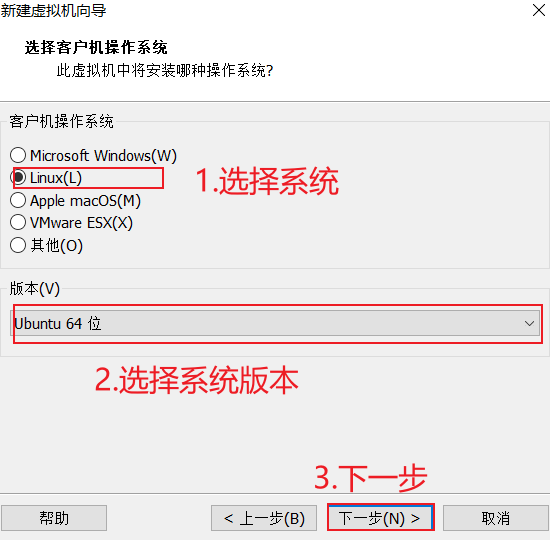
默认会搜索出很多不相关的包。

3.4.5 通过可执行文件来搜索包名(好用)

1
yum provides "*bin/名称"
1
2
3
4
5
6
7
8
9
10
11
12
13
14
15
16
17
18
19
20
21
[root@centos7 ~]# yum provides "*bin/netstat"
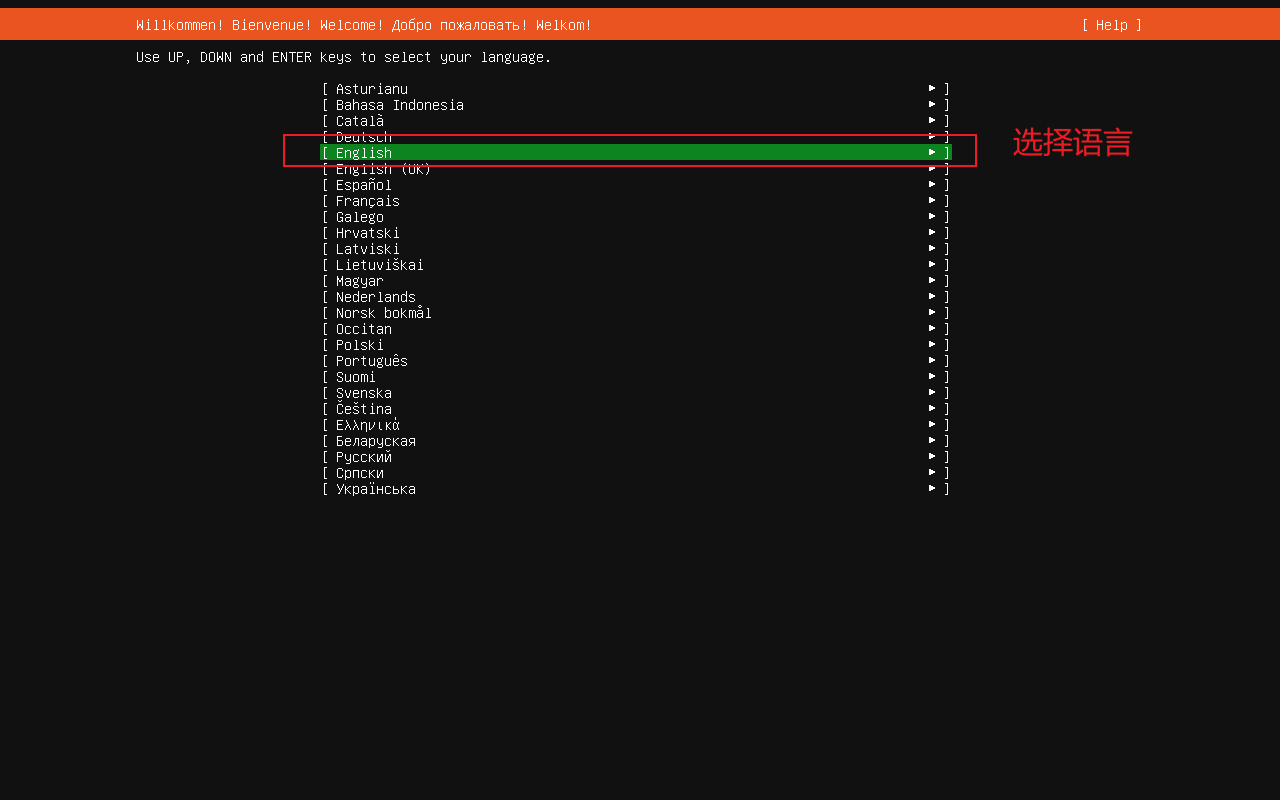
Loaded plugins: fastestmirror
Loading mirror speeds from cached hostfile
* base: mirrors.aliyun.com
* extras: mirrors.aliyun.com
* updates: mirrors.aliyun.com
net-tools-2.0-0.25.20131004git.el7.x86_64 : Basic networking tools
Repo : base
Matched from:
Filename : /bin/netstat


net-tools-2.0-0.25.20131004git.el7.x86_64 : Basic networking tools
Repo : @base
Matched from:
Filename : /bin/netstat


[root@centos7 ~]#
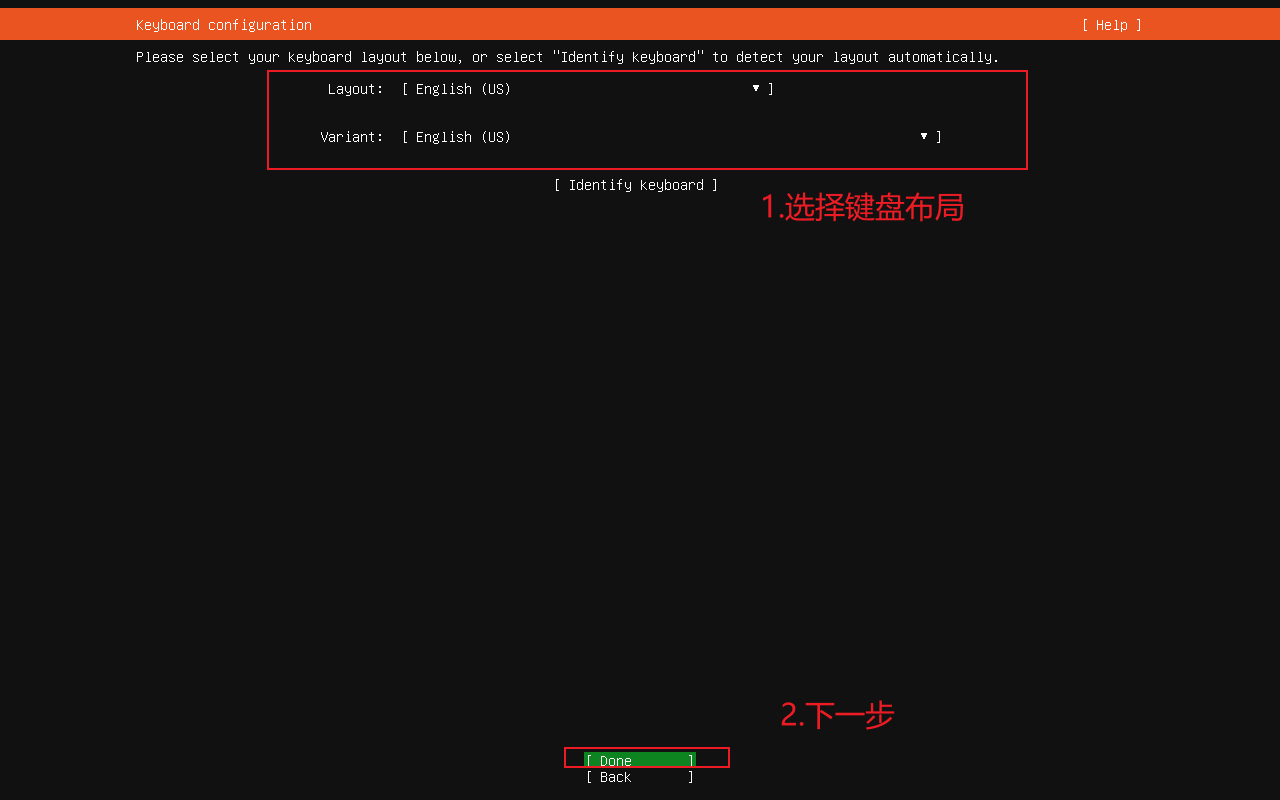
3.5 软件仓库

简单来说,就是从哪里可以下载软件包,centos7默认提供的仓库已经不维护了,所以一般改用阿里云、网易、清华源等镜像仓库。

每个仓库体现在/etc/yum.repos.d 目录下的一个.repo 文件,里面记录了从哪里下载。

  • base.repo 核心仓库。
  • epel.repo 企业版Linux额外软件

3.5.1 换仓库源

把无效的.repo 文件删除/备份,下载可用的.repo 文件即可。

1
2
3
4
5
#配置阿里云基础源(base,extras,updates)
curl https://mirrors.aliyun.com/repo/Centos-7.repo -o /etc/yum.repos.d/CentOS-Base.repo

#配置阿里云EPEL源
curl https://mirrors.aliyun.com/repo/epel-7.repo -o /etc/yum.repos.d/epel.repo
1
curl https://mirrors.163.com/.help/CentOS7-Base-163.repo -o /etc/yum.repos.d/CentOS7-Base-163.repo

3.5.2 生成缓存

1
2
yum clean all
yum makecache

3.5.3 查看仓库列表

1
yum repolist
1
2
3
4
5
6
7
8
9
10
11
12
13
[root@centos7 ~]# yum repolist
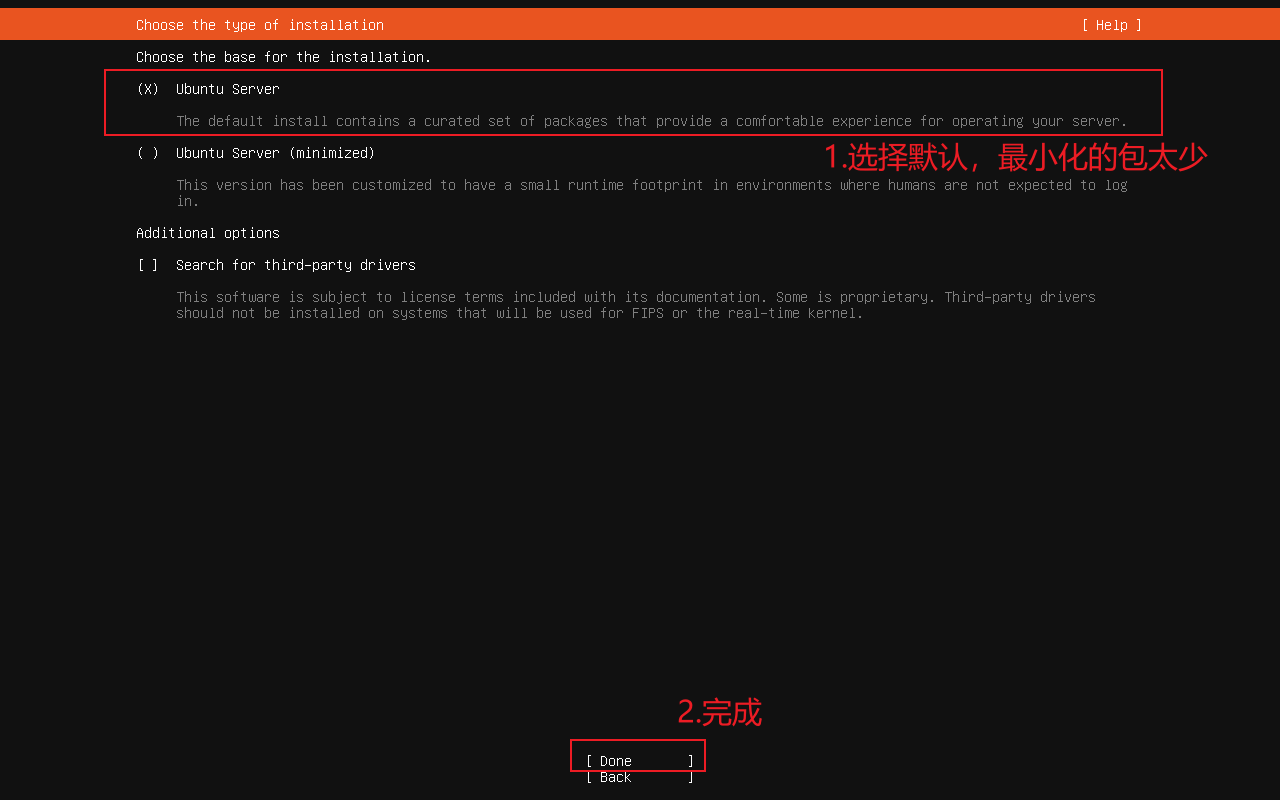
Loaded plugins: fastestmirror
Loading mirror speeds from cached hostfile
* base: mirrors.aliyun.com
* extras: mirrors.aliyun.com
* updates: mirrors.aliyun.com
repo id repo name status
base/7/x86_64 CentOS-7 - Base - mirrors.aliyun.com 10,072
epel/x86_64 Extra Packages for Enterprise Linux 7 - x86_64 13,791
extras/7/x86_64 CentOS-7 - Extras - mirrors.aliyun.com 526
updates/7/x86_64 CentOS-7 - Updates - mirrors.aliyun.com 6,173
repolist: 30,562
[root@centos7 ~]#
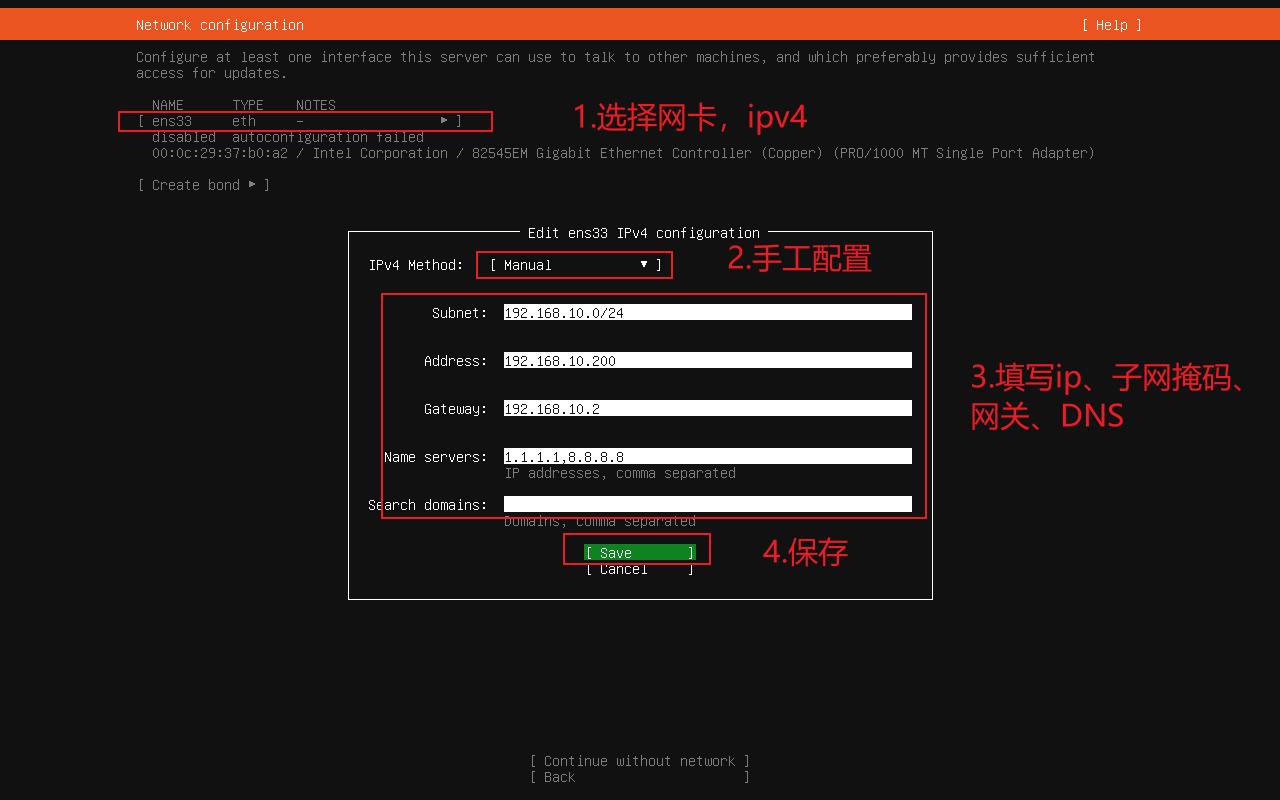
三、DNF

特性 yum dnf
全称 Yellowdog Updater Modified Dandified YUM
版本 CentOS 7 默认 CentOS 8+ 默认
依赖处理 基于 Python 2,依赖解析比较慢 基于 libsolv(更高效),依赖解析快
性能 较慢,尤其是大仓库 快,内存占用低
插件机制 丰富,但维护复杂 插件机制改进,更稳定
事务管理 基本事务处理 支持回滚(事务更安全)
兼容性 CentOS 7 系统默认,yum 命令熟悉 dnf 兼容 yum 命令,但语法更现代

四、封面图

封面图

VMware安装Ubuntu24

认真整理一遍吧。

一、基础环境

  • Windows10 IoT 2021 LTSC
  • VMware 17.6.4
  • ubuntu-24.04.2-live-server-amd64.iso 镜像

二、详细步骤

2.1 建立虚拟机

2.1.1 新建虚拟机

001-新建虚拟机

2.1.2 选择硬件兼容性,保持默认

002-选择硬件兼容性,保持默认

2.1.3 稍后安装操作系统

003-稍后安装操作系统

2.1.4 选择操作系统版本

004-选择操作系统版本

2.1.5 设置虚拟机名称和存放路径

005-设置虚拟机名称和存放路径

2.1.6 设置处理器数量

006-设置处理器数量

2.1.7 设置内存大小

007-设置内存大小

2.1.8 设置网络类型

008-设置网络类型

2.1.9 选择IO 控制器

009-选择IO控制器

2.1.10 选择磁盘类型

010-选择磁盘类型

2.1.11 创建新磁盘

011-创建新磁盘

2.1.12 设置磁盘参数

012-设置磁盘参数

2.1.13 设置磁盘文件的路径

013-设置磁盘文件的路径

2.1.14 自定义硬件,设置光驱

014-自定义硬件,设置光驱

2.1.15 设置光驱位镜像文件

015-设置光驱位镜像文件

2.1.16 完成虚拟机的安装

016-完成虚拟机的安装

2.2 安装虚拟机

2.2.1 开启虚拟机

image-20250929162733156

2.2.2 选择安装

002-选择安装

2.2.3 选择语言

003-选择语言

2.2.4 选择键盘布局

004-选择键盘布局

2.2.5 选择安装类型,最小化安装不好用

005-选择安装类型,最小化安装不好用

2.2.6 配置静态ipv4地址

006-1-配置静态ipv4地址

006-2-注意事项,配置的静态ip地址须在NAT的子网下

2.2.7 设置代理服务器

007-设置代理服务器

2.2.8 配置镜像源,默认会自行选择最近的。

008-配置镜像源

2.2.9 是否更新为最新的系统

009-是否更新为最新的系统

2.2.10 使用默认分区方案

010-使用默认分区方案

2.2.11 查看系统的分区方案

011-查看系统的分区方案

2.2.12 确认将分区信息写入硬盘

012-确认将分区信息写入硬盘

2.2.13 创建用户、设置主机名

013-创建用户、设置主机名

2.2.14 不开启ubuntu pro

014-不开启`ubuntu pro`

2.2.15 安装openssh server

015-安装`openssh server`

2.2.16 安装所需的snap包,讨厌snap 的包,安装过docker 一堆问题。

016-安装所需的`snap`包

2.2.17 等待安装完毕重启

017-等待安装完毕重启

三、封面图

封面图

Vmware安装CentOS7

认真整理一遍吧。

一、基础环境

  • Windows10 IoT 2021 LTSC
  • VMware 17.6.4
  • CentOS-7-x86_64-DVD-2009.iso 镜像

二、详细步骤

2.1 建立虚拟机

  1. 新建虚拟机
    001-新建虚拟机

  2. 选择硬件兼容性,保持默认

    002-选择硬件兼容性,保持默认

  3. 稍后安装操作系统
    003-稍后安装操作系统

  4. 选择操作系统版本
    004-选择操作系统版本

  5. 设置虚拟机名称和存放路径
    005-设置虚拟机名称和存放路径

  6. 设置处理器数量
    006-设置处理器数量

  7. 设置内存大小
    007-设置内存大小

  8. 设置网络类型
    008-设置网络类型

  9. 选择IO 控制器
    009-选择IO控制器

  10. 选择磁盘类型
    010-选择磁盘类型

  11. 创建新磁盘
    011-创建新磁盘

  12. 设置磁盘参数
    012-设置磁盘参数

  13. 设置磁盘文件的路径
    013-设置磁盘文件的路径

  14. 自定义硬件,设置光驱
    014-自定义硬件,设置光驱

  15. 设置光驱位镜像文件
    015-设置光驱位镜像文件

  16. 完成虚拟机的安装
    016-完成虚拟机的安装

2.2 安装操作系统

  1. 开启虚拟机
    001-开启虚拟机

  2. 安装系统,或测试光驱后安装系统
    002-安装系统,或测试光驱后安装系统

  3. 选择语言为英文
    003-选择语言为英文

  4. 设置时区为上海
    004-1-设置时区为上海

    004-2-设置时区为上海

  5. 设置磁盘分区为默认
    005-1-设置磁盘分区为默认

    005-2-设置磁盘分区为默认

设置网络时,如果选择 NAT,静态 IP 要和 VMware NAT 的子网一致,否则无法联网。

  1. 设置网络
    006-1-设置网络
    006-2-设置主机名
    006-3-设置ipv4
    006-4-手工配置静态ip地址
    006-5-注意事项,配置的静态ip地址须在NAT的子网下
    006-6-完成网络配置

  2. 开始安装
    007-开始安装

  3. 设置root密码
    008-1-设置root密码
    008-2-完成root密码设置

  4. 新建普通用户,并加入管理员组
    009-1-设置普通用户

    009-2-设置用户名密码及加入管理员组

  5. 完成配置
    010-完成配置

  6. 等待安装完成后重启
    011-等待安装完成后重启

三、基础设置

3.1 配置阿里云 YUM

  1. 删除系统原有的YUM源
1
rm -rf /etc/yum.repos.d/*
  1. 配置阿里云基础源(base,extras,updates)
1
curl https://mirrors.aliyun.com/repo/Centos-7.repo -o /etc/yum.repos.d/CentOS-Base.repo
  1. 配置阿里云EPEL源
1
curl https://mirrors.aliyun.com/repo/epel-7.repo -o /etc/yum.repos.d/epel.repo

四、封面图

封面图

深信服VPN卸载不掉,自动安装证书,可以监控https流量,饱受人们诟病,但是实际使用中又不可能不用。使用虚拟机隔离是一种解决方案,但是占用有点大,使用Docker隔离可以很好的解决这个问题。

一、官方地址

二、使用Docker compose部署

最近喜欢使用compose来部署应用,之后迁移只需要迁移映射出来的数据、docker-compos.yml文件即可。

低版本7.6.3

1
2
3
4
5
6
7
8
9
10
11
12
13
14
15
16
17
18
19
20
21
22
23
24
25
26
27
28
29
30
31
version: '3.8'

services:
easyconnect-vnc:
image: hagb/docker-easyconnect:7.6.3
container_name: easyconnect-vnc
restart: unless-stopped

# 网络权限
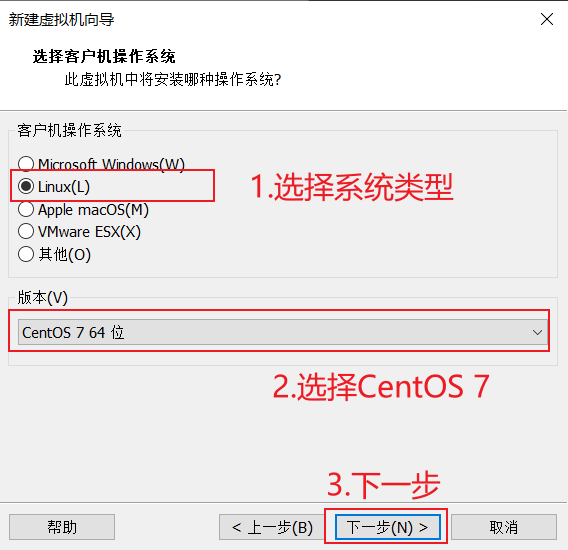
devices:
- /dev/net/tun
cap_add:
- NET_ADMIN

# 环境变量配置
environment:
# VNC 密码
- PASSWORD=123456
# 启用 URL 窗口
- URLWIN=1
# ARM64 和 MIPS64EL 架构需要这个参数
# - DISABLE_PKG_VERSION_XML=1

# 端口映射
ports:
# VNC 端口
- "127.0.0.1:55901:5901"
# SOCKS5 代理端口
- "127.0.0.1:51080:1080"
# HTTP 代理端口
- "127.0.0.1:58888:8888"

高版本7.6.7

1
2
3
4
5
6
7
8
9
10
11
12
13
14
15
16
17
18
19
20
21
22
23
24
25
26
27
28
29
30
31
version: '3.8'

services:
easyconnect-vnc:
image: hagb/docker-easyconnect:7.6.7
container_name: easyconnect-vnc
restart: unless-stopped

# 网络权限
devices:
- /dev/net/tun
cap_add:
- NET_ADMIN

# 环境变量配置
environment:
# VNC 密码
- PASSWORD=123456
# 启用 URL 窗口
- URLWIN=1
# ARM64 和 MIPS64EL 架构需要这个参数
# - DISABLE_PKG_VERSION_XML=1

# 端口映射
ports:
# VNC 端口
- "127.0.0.1:55901:5901"
# SOCKS5 代理端口
- "127.0.0.1:51080:1080"
# HTTP 代理端口
- "127.0.0.1:58888:8888"

注意:windows默认的Hyper-V 保留了一些端口号,所以需要手动改到一些可以使用的1端口号。

查看windows保留端口号的命令

1
netsh interface ipv4 show excludedportrange protocol=tcp

启动容器

1
docker-compose up -d

使用VNC登录VPN后,即可使用映射出来的代理。

三、问题(未解决)

  1. 大多数情况都卸载不干净,最后都是重装系统。
  2. 实际使用中,如果是Xshell还好,但是navicat 就遇到过不少次配置了代理,实际上没有成功的情况,搞得很难受。以后仔细解决吧!

四、参考文献

anki只一款卡片记忆软件,里面的卡片同步服务器可以自部署,让数据掌握在自己手中,依旧是使用 docker-compose 部署。

一、官网

二、部署

创建应用文件夹

1
2
3
mkdir -p /opt/selfhost/anki-sync-server
cd /opt/selfhost/anki-sync-server
touch docker-compose.yml

编辑 compose 文件,按照需求添加不同的用户,推荐使用邮箱形式的用户名,修改为喜欢的端口号。

1
2
3
4
5
6
7
8
9
10
11
12
13
14
15
16
17
18
19
20
version: "3.8"

services:
anki:
image: johngong/anki-sync-server:latest
container_name: anki
restart: unless-stopped
ports:
- "8080:8080"
volumes:
- ./ankisyncdir:/ankisyncdir
environment:
TZ: Asia/Shanghai
SYNC_USER1: "user:pass" # 支持多个用户,增加 SYNC_USER2, SYNC_USER3 ...
SYNC_BASE: /ankisyncdir
UID: "1000"
GID: "1000"
SYNC_PORT: "8080"
SYNC_HOST: "0.0.0.0"
MAX_SYNC_PAYLOAD_MEGS: "100"

启动容器

1
docker-compose up -d

记得定期备份映射出来的数据文件夹。

三、参考文献

Casdoor是一个可自行部署的单点登录系统,方便一处登录,方便使用各种统一服务商提供的服务。

一、官方网址

二、部署

docker compose 部署

  1. 创建docker-compose.yml文件
1
2
3
4
mkdir -p /opt/selfhost/casdoor

cd /opt/selfhost/casdoor
vim docker-compose.yml

从仓库里复制文件内容

1
2
3
4
5
6
7
8
9
10
11
12
13
14
15
16
17
18
19
20
21
22
23
24
25
26
27
28
29
30
31
32
33
34
35
version: '3.8'

services:
mysql:
image: mysql:8.0.25
container_name: casdoor-mysql
restart: always
environment:
MYSQL_ROOT_PASSWORD: root123456 # 修改成安全密码
MYSQL_DATABASE: casdoor # 自动创建数据库
MYSQL_USER: casdoor
MYSQL_PASSWORD: casdoor123
volumes:
- ./mysql_data:/var/lib/mysql # 数据持久化,方便备份
networks:
- casdoor-net

casdoor:
image: casbin/casdoor:latest
container_name: casdoor
restart: always
ports:
- "8000:8000"
environment:
driverName: mysql
dataSourceName: "casdoor:casdoor123@tcp(mysql:3306)/"
dbName: casdoor
depends_on:
- mysql
networks:
- casdoor-net

networks:
casdoor-net:
driver: bridge

启动容器

1
docker-compose up -d

使用,放公网上的话,记得及时修改密码

1
2
3
http://127.0.0.1:8000
admin
123

三、评价

网上都是喷的,代码质量堪忧,不建议在生产环境使用等等的声音很多。自己瞎玩玩,还玩不明白。

四、参考文献

OpenList 是AList的分支,因为AList作者悄咪咪把项目卖了,产生了信任危机。网盘聚合工具。

一、官方地址

二、部署

docker-compose 部署

基础版本

1
2
3
mkdir -p /opt/selfhost/openlist
cd /opt/selfhost/openlist
vim docker-compose.yml

这里可修改openlist运行的uid、gid

1
2
3
4
5
6
7
8
9
10
11
12
13
# docker-compose.yml
services:
openlist:
image: 'openlistteam/openlist:latest'
container_name: openlist
user: '0:0'
volumes:
- './data:/opt/openlist/data'
ports:
- '5244:5244'
environment:
- UMASK=022
restart: unless-stopped

启动容器

1
docker-compose up -d

首次使用看密码

1
docker logs openlist

修改为随机密码

1
2
# 重新随机生成密码
docker exec -it openlist ./openlist admin random

手动修改密码

1
2
# 手动设置密码为 `NEW_PASSWORD`(替换为您要设置的密码)
docker exec -it openlist ./openlist admin set NEW_PASSWORD

访问

1
http:/127.0.0.1:5244

三、好用的功能

  1. 对象存储S3协议映射成webdav,将webdav协议映射成S3
  2. 聚合Github Release页面。
  3. 渲染markdown,HTML。

四、容器托管到个人玩家(高风险行为)

在某些平台充斥着一些个人托管服务,有风险。恶意托管者可在不惊扰用户的情况下,查看用户的所有云盘及密钥。

五、封面图

封面图

Z-Library 是世界上最大的电子图书馆,拥有海量的图书,但是域名一直被封,厌烦了这种状态,创建专属于自己的Telegram Bot来使用。

一、镜像站点汇总

https://zlib.wwwnav.com/

二、开始

登录账号后,我的账户,其他,电报机器人,按照步骤创建即可。

1
https://t.me/BotFather
1
/newbot
1
Bravexist_Zlib_Bot

将密钥添加到zlib给的框框。

1
@Bravexist_Zlib_Bot

三、参考文献

0%