# 查看/var/log/secure的最后10行 [root@centos7 ~]# tail /var/log/secure Oct 3 17:21:15 centos7 groupadd[1949]: new group: name=apache, GID=48 Oct 3 17:21:15 centos7 useradd[1953]: new user: name=apache, UID=48, GID=48, home=/usr/share/httpd, shell=/sbin/nologin Oct 3 17:33:46 centos7 useradd[2009]: failed adding user 'apache', exit code: 9 Oct 3 18:35:35 centos7 sshd[1373]: pam_unix(sshd:session): session closed for user root Oct 4 12:19:01 centos7 sshd[2228]: Accepted password for root from 192.168.10.1 port 5763 ssh2 Oct 4 12:19:01 centos7 sshd[2228]: pam_unix(sshd:session): session opened for user root by (uid=0) Oct 4 12:19:02 centos7 sshd[2231]: Accepted password for root from 192.168.10.1 port 5766 ssh2 Oct 4 12:19:02 centos7 sshd[2231]: pam_unix(sshd:session): session opened for user root by (uid=0) Oct 4 12:24:37 centos7 sshd[4226]: Accepted password for root from 192.168.10.1 port 7334 ssh2 Oct 4 12:24:37 centos7 sshd[4226]: pam_unix(sshd:session): session opened for user root by (uid=0) [root@centos7 ~]#
# 查看/var/log/secure的最后三行 [root@centos7 ~]# tail -n3 /var/log/secure Oct 4 12:19:02 centos7 sshd[2231]: pam_unix(sshd:session): session opened for user root by (uid=0) Oct 4 12:24:37 centos7 sshd[4226]: Accepted password for root from 192.168.10.1 port 7334 ssh2 Oct 4 12:24:37 centos7 sshd[4226]: pam_unix(sshd:session): session opened for user root by (uid=0) [root@centos7 ~]#
# 查看最新的日志,空格后是最新的日志 [root@centos7 ~]# tail -f /var/log/secure -n1 Oct 4 12:24:37 centos7 sshd[4226]: pam_unix(sshd:session): session opened for user root by (uid=0)
Oct 4 13:30:25 centos7 sshd[28013]: Accepted password for root from 192.168.10.1 port 13653 ssh2 Oct 4 13:30:25 centos7 sshd[28013]: pam_unix(sshd:session): session opened for user root by (uid=0) Oct 4 13:30:26 centos7 sshd[28018]: Accepted password for root from 192.168.10.1 port 13654 ssh2 Oct 4 13:30:26 centos7 sshd[28018]: pam_unix(sshd:session): session opened for user root by (uid=0)
-- CMAKE_CXX_FLAGS_RELWITHDEBINFO: -O3 -g -fabi-version=2 -fno-omit-frame-pointer -fno-strict-aliasing -DDBUG_OFF -- Configuring done -- Generating done CMake Warning: Manually-specified variables were not used by the project:
PID_FILE WITH_READLINE
-- Build files have been written to: /root/mysql-5.7.27 [root@source-mysql mysql-5.7.27]#
[root@source-mysql mysql]# ./bin/mysqld --initialize --user=mysql --basedir=/usr/local/mysql --datadir=/usr/local/mysql/data 2025-10-13T12:00:08.000667Z 0 [Warning] TIMESTAMP with implicit DEFAULT value is deprecated. Please use --explicit_defaults_for_timestamp server option (see documentation for more details). 2025-10-13T12:00:08.153045Z 0 [Warning] InnoDB: New log files created, LSN=45790 2025-10-13T12:00:08.179711Z 0 [Warning] InnoDB: Creating foreign key constraint system tables. 2025-10-13T12:00:08.234856Z 0 [Warning] No existing UUID has been found, so we assume that this is the first time that this server has been started. Generating a new UUID: 29d529ae-a82c-11f0-9b66-000c29e8cb85. 2025-10-13T12:00:08.235246Z 0 [Warning] Gtid table is not ready to be used. Table 'mysql.gtid_executed' cannot be opened. 2025-10-13T12:00:08.559344Z 0 [Warning] CA certificate ca.pem is self signed. 2025-10-13T12:00:08.713531Z 1 [Note] A temporary password is generated for root@localhost: Btj/X,X18arj [root@source-mysql mysql]#
[root@yum-mysql8 ~]# yum repolist enabled | grep mysql
mysql-connectors-community/x86_64 MySQL Connectors Community 286 mysql-tools-community/x86_64 MySQL Tools Community 116 mysql80-community/x86_64 MySQL 8.0 Community Server 579 [root@yum-mysql8 ~]#
安装 MySQL-Server
1
yum install mysql-community-server -y
开机启动
1 2
systemctl start mysqld systemctl enable mysqld
验证启动成功
1
systemctl status mysqld
启动成功效果
1 2 3 4 5 6 7 8 9 10 11 12 13 14
[root@yum-mysql8 ~]# systemctl status mysqld ● mysqld.service - MySQL Server Loaded: loaded (/usr/lib/systemd/system/mysqld.service; enabled; vendor preset: disabled) Active: active (running) since Tue 2025-10-14 10:06:58 CST; 17s ago Docs: man:mysqld(8) http://dev.mysql.com/doc/refman/en/using-systemd.html Main PID: 4928 (mysqld) Status: "Server is operational" CGroup: /system.slice/mysqld.service └─4928 /usr/sbin/mysqld
Oct 14 10:06:53 yum-mysql8 systemd[1]: Starting MySQL Server... Oct 14 10:06:58 yum-mysql8 systemd[1]: Started MySQL Server. [root@yum-mysql8 ~]#
从日志中获取临时密码
1
grep 'temporary password' /var/log/mysqld.log
1
2
3
[root@yum-mysql8 ~]# grep 'temporary password' /var/log/mysqld.log 2025-10-14T02:06:54.878116Z 6 [Note] [MY-010454] [Server] A temporary password is generated for root@localhost: FkSpsqblF1.a [root@yum-mysql8 ~]#
登录mysql 后改密码
1
mysql -u root -p
1
ALTER USER 'root'@'localhost' IDENTIFIED BY '新密码';
1
ALTER USER 'root'@'localhost' IDENTIFIED BY 'Root21..';
验证新密码
1
mysql -u root -p'Root21..'
1 2 3 4 5 6 7 8 9 10 11 12 13 14 15 16
[root@yum-mysql8 ~]# mysql -u root -p'Root21..' mysql: [Warning] Using a password on the command line interface can be insecure. Welcome to the MySQL monitor. Commands end with ; or \g. Your MySQL connection id is 8 Server version: 8.0.43 MySQL Community Server - GPL
Copyright (c) 2000, 2025, Oracle and/or its affiliates.
Oracle is a registered trademark of Oracle Corporation and/or its affiliates. Other names may be trademarks of their respective owners.
Type 'help;' or '\h'forhelp. Type '\c' to clear the current input statement.
Securing the MySQL server deployment. ## 1. 首先需要验证root密码 Enter password for user root:
VALIDATE PASSWORD COMPONENT can be used to test passwords and improve security. It checks the strength of password and allows the users to set only those passwords which are secure enough. Would you like to setup VALIDATE PASSWORD component?
Press y|Y for Yes, any other key for No: y
There are three levels of password validation policy:
LOW Length >= 8 MEDIUM Length >= 8, numeric, mixed case, and special characters STRONG Length >= 8, numeric, mixed case, special characters and dictionary file # 2. 是否启用“密码强度验证组件(VALIDATE PASSWORD)按0,1,2来选择不同的密码强度 Please enter 0 = LOW, 1 = MEDIUM and 2 = STRONG: 1 Using existing password for root.
Estimated strength of the password: 100 # 3. 是否要 修改 root 用户的密码。 Change the password for root ? ((Press y|Y for Yes, any other key for No) : n
... skipping. By default, a MySQL installation has an anonymous user, allowing anyone to log into MySQL without having to have a user account created for them. This is intended only for testing, and to make the installation go a bit smoother. You should remove them before moving into a production environment. # 4. 是否删除匿名用户。 Remove anonymous users? (Press y|Y for Yes, any other key for No) : y Success.
Normally, root should only be allowed to connect from 'localhost'. This ensures that someone cannot guess at the root password from the network. # 5. 是否禁止 root 用户远程登录。 Disallow root login remotely? (Press y|Y for Yes, any other key for No) : y Success.
By default, MySQL comes with a database named 'test' that anyone can access. This is also intended only for testing, and should be removed before moving into a production environment.
# 6. 默认会有一个名为 test 的数据库,是否删除它 Remove test database and access to it? (Press y|Y for Yes, any other key for No) : y - Dropping test database... Success.
- Removing privileges on test database... Success.
Reloading the privilege tables will ensure that all changes made so far will take effect immediately. # 7. 是否立即重新加载权限表(privilege tables Reload privilege tables now? (Press y|Y for Yes, any other key for No) : y Success.
All done! ubuntu@sg-oracle-2c12g-01:~$
设置密码
1 2
ALTERUSER'root'@'localhost' IDENTIFIED WITH mysql_native_password BY'你的密码'; FLUSH PRIVILEGES;
# 法二,看服务状态 root@sg-oracle-2c12g-01:~# systemctl status nginx ● nginx.service - A high performance web server and a reverse proxy server Loaded: loaded (/lib/systemd/system/nginx.service; enabled; vendor preset: enabled) Active: active (running) since Sun 2025-10-12 07:03:36 UTC; 14min ago Docs: man:nginx(8) Main PID: 20400 (nginx) Tasks: 3 (limit: 14231) Memory: 3.2M CPU: 23ms CGroup: /system.slice/nginx.service ├─20400 "nginx: master process /usr/sbin/nginx -g daemon on; master_process on;" ├─20401 "nginx: worker process""""""""""""""""""""""""""""""""""""""" └─20402 "nginx: worker process"""""""""""""""""""""""""""""""""""""""
Oct 12 07:03:36 sg-oracle-2c12g-01 systemd[1]: Starting A high performance web server and a reverse proxy server... Oct 12 07:03:36 sg-oracle-2c12g-01 systemd[1]: Started A high performance web server and a reverse proxy server. root@sg-oracle-2c12g-01:~#
[root@centos9 ~]# find / -size +50M /boot/initramfs-0-rescue-7ed357ca5a7e42419dd56d6e3dbb1f24.img /proc/kcore find: ‘/proc/1961/task/1961/fd/6’: No such file or directory find: ‘/proc/1961/task/1961/fdinfo/6’: No such file or directory find: ‘/proc/1961/fd/5’: No such file or directory find: ‘/proc/1961/fdinfo/5’: No such file or directory /sys/devices/pci0000:00/0000:00:0f.0/resource1 /sys/devices/pci0000:00/0000:00:0f.0/resource1_wc [root@centos9 ~]#
# 查看文件中的错误输出 [root@centos9 ~]# cat error.txt find: ‘/proc/2008/task/2008/fd/6’: No such file or directory find: ‘/proc/2008/task/2008/fdinfo/6’: No such file or directory find: ‘/proc/2008/fd/5’: No such file or directory find: ‘/proc/2008/fdinfo/5’: No such file or directory [root@centos9 ~]#
# 查看标准错误输出 [root@centos9 ~]# cat error.txt find: ‘/proc/1997/task/1997/fd/6’: No such file or directory find: ‘/proc/1997/task/1997/fdinfo/6’: No such file or directory find: ‘/proc/1997/fd/5’: No such file or directory find: ‘/proc/1997/fdinfo/5’: No such file or directory [root@centos9 ~]#
1.3.3 合并重定向
法一,混合重定向
1
命令 &> all.txt
1 2 3 4 5 6 7 8 9 10 11
[root@centos9 ~]# find / -size +50M &> all.txt [root@centos9 ~]# cat all.txt /boot/initramfs-0-rescue-7ed357ca5a7e42419dd56d6e3dbb1f24.img /proc/kcore find: ‘/proc/2001/task/2001/fd/6’: No such file or directory find: ‘/proc/2001/task/2001/fdinfo/6’: No such file or directory find: ‘/proc/2001/fd/5’: No such file or directory find: ‘/proc/2001/fdinfo/5’: No such file or directory /sys/devices/pci0000:00/0000:00:0f.0/resource1 /sys/devices/pci0000:00/0000:00:0f.0/resource1_wc [root@centos9 ~]#
法二,混合重定向,标准错误重定向到标准输出。
1
命令 > all.txt 2>&1
1 2 3 4 5 6 7 8 9 10 11
[root@centos9 ~]# find / -size +50M > all.txt 2>&1 [root@centos9 ~]# cat all.txt /boot/initramfs-0-rescue-7ed357ca5a7e42419dd56d6e3dbb1f24.img /proc/kcore find: ‘/proc/2005/task/2005/fd/6’: No such file or directory find: ‘/proc/2005/task/2005/fdinfo/6’: No such file or directory find: ‘/proc/2005/fd/5’: No such file or directory find: ‘/proc/2005/fdinfo/5’: No such file or directory /sys/devices/pci0000:00/0000:00:0f.0/resource1 /sys/devices/pci0000:00/0000:00:0f.0/resource1_wc [root@centos9 ~]#
# centos9配置邮箱 ~/.mailrc set from="你的邮箱@qq.com(昵称)" set smtp="smtps://smtp.qq.com:465" set smtp-auth=login set smtp-auth-user="你的邮箱@qq.com" set smtp-auth-password="你的授权码" set ssl-verify=ignore
发送邮件
输入重定向文件内容给 mail
1
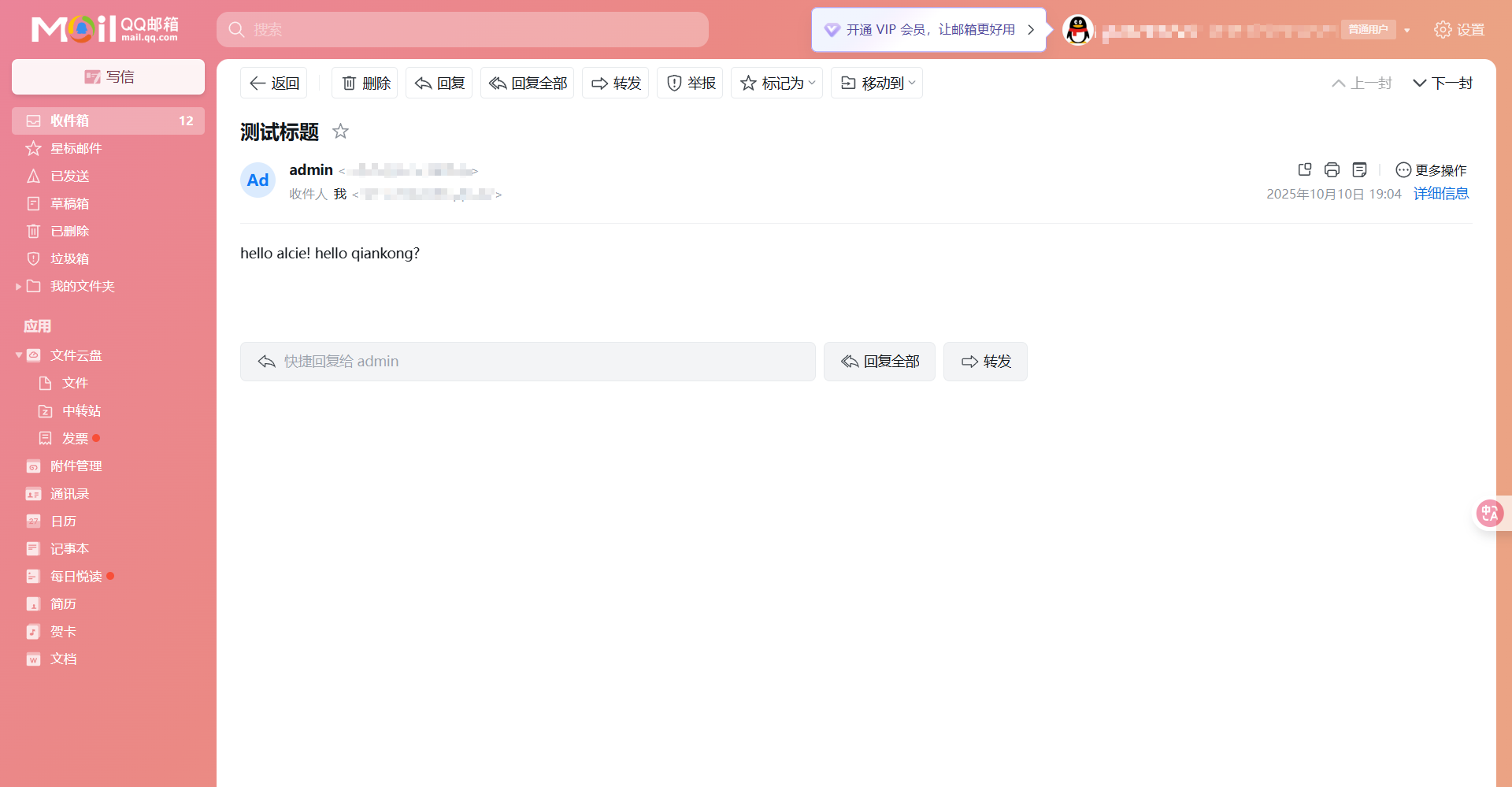
mail -s "测试标题" 收件人@example.com < body.txt
1 2 3 4 5 6 7 8 9
[root@centos9 ~]# mail -s "测试标题" **********@qq.com < body.txt s-nail: Warning: variable superseded or obsoleted: smtp s-nail: Warning: variable superseded or obsoleted: smtp-auth-user s-nail: Warning: variable superseded or obsoleted: smtp-auth-password s-nail: Warning: variable superseded or obsoleted: ssl-verify s-nail: Obsoletion warning: please do not use *smtp*, instead assign a smtp:// URL to *mta*! s-nail: Obsoletion warning: Use of old-style credentials, which will vanish in v15! s-nail: Please read the manual section "On URL syntax and credential lookup" [root@centos9 ~]#
# Uncomment this to allow the anonymous FTP user to upload files. This only # has an effect if the above global write enable is activated. Also, you will # obviously need to create a directory writable by the FTP user. # When SELinux is enforcing check for SE bool allow_ftpd_anon_write, allow_ftpd_full_access # 需要全局可写激活,需要目录被ftp用户可写,需要selinux 权限通过 # 匿名用户是否可上传文件 anon_upload_enable=YES
# Uncomment this if you want the anonymous FTP user to be able to create new directories. # 允许匿名用户创建文件夹 # 匿名用户是否可创建文件夹 anon_mkdir_write_enable=YES
# Uncomment this to allow local users to log in. # 是否启用本地用户 local_enable=YES #
# 全局写权限 # Uncomment this to enable any form of FTP write command. write_enable=YES #
# Default umask for local users is 077. You may wish to change this to 022, # if your users expect that (022 is used by most other ftpd's) # 默认去掉的权限 local_umask=022
# You may specify an explicit list of local users to chroot() to their home # directory. If chroot_local_user is YES, then this list becomes a list of # users to NOT chroot(). # (Warning! chroot'ing can be very dangerous. If using chroot, make sure that # the user does not have write access to the top level directory within the # chroot) # 限制用户只能访问自己的家目录,从2.3.5版本开始,出于安全考虑,默认禁止用户在其 chroot 目录(即 FTP 根目录)拥有写权限。 chroot_local_user=YES
# ip route [root@centos7 ~]# ip route default via 192.168.10.2 dev ens33 proto static metric 100 192.168.10.0/24 dev ens33 proto kernel scope link src 192.168.10.10 metric 100 [root@centos7 ~]#
# route -n [root@centos7 ~]# route -n Kernel IP routing table Destination Gateway Genmask Flags Metric Ref Use Iface 0.0.0.0 192.168.10.2 0.0.0.0 UG 100 0 0 ens33 192.168.10.0 0.0.0.0 255.255.255.0 U 100 0 0 ens33 [root@centos7 ~]#
root@ubuntu24server:~# resolvectl status Global Protocols: -LLMNR -mDNS -DNSOverTLS DNSSEC=no/unsupported resolv.conf mode: stub
Link 2 (ens33) Current Scopes: DNS Protocols: +DefaultRoute -LLMNR -mDNS -DNSOverTLS DNSSEC=no/unsupported DNS Servers: 1.1.1.1 8.8.8.8 root@ubuntu24server:~#
[root@centos7 ~]# ip addr show lo 1: lo: <LOOPBACK,UP,LOWER_UP> mtu 65536 qdisc noqueue state UNKNOWN group default qlen 1000 link/loopback 00:00:00:00:00:00 brd 00:00:00:00:00:00 inet 127.0.0.1/8 scope host lo valid_lft forever preferred_lft forever inet6 ::1/128 scope host valid_lft forever preferred_lft forever [root@centos7 ~]#
# 停用网卡 [root@centos7 ~]# ip linkset lo down [root@centos7 ~]# ip addr show lo 1: lo: <LOOPBACK> mtu 65536 qdisc noqueue state DOWN group default qlen 1000 link/loopback 00:00:00:00:00:00 brd 00:00:00:00:00:00 inet 127.0.0.1/8 scope host lo valid_lft forever preferred_lft forever [root@centos7 ~]#
# 启用网卡 [root@centos7 ~]# ip linkset lo up [root@centos7 ~]# ip addr show lo 1: lo: <LOOPBACK,UP,LOWER_UP> mtu 65536 qdisc noqueue state UNKNOWN group default qlen 1000 link/loopback 00:00:00:00:00:00 brd 00:00:00:00:00:00 inet 127.0.0.1/8 scope host lo valid_lft forever preferred_lft forever inet6 ::1/128 scope host valid_lft forever preferred_lft forever [root@centos7 ~]#
; <<>> DiG 9.11.4-P2-RedHat-9.11.4-26.P2.el7_9.16 <<>> bravexist.cn ;; global options: +cmd ;; Got answer: ;; ->>HEADER<<- opcode: QUERY, status: NOERROR, id: 53809 ;; flags: qr rd ra ad; QUERY: 1, ANSWER: 2, AUTHORITY: 0, ADDITIONAL: 1 ;; OPT PSEUDOSECTION: ; EDNS: version: 0, flags:; udp: 1232 ;; QUESTION SECTION: ;bravexist.cn. IN A ;; ANSWER SECTION: bravexist.cn. 300 IN A 104.21.67.121 bravexist.cn. 300 IN A 172.67.221.229 ;; Query time: 346 msec ;; SERVER: 1.1.1.1#53(1.1.1.1) ;; WHEN: Tue Oct 07 13:11:17 CST 2025 ;; MSG SIZE rcvd: 73 [root@centos7 ~]#
host
1
host 域名
1 2 3 4 5 6 7 8 9
[root@centos7 ~]# host bravexist.cn bravexist.cn has address 104.21.67.121 bravexist.cn has address 172.67.221.229 bravexist.cn has IPv6 address 2606:4700:3031::ac43:dde5 bravexist.cn has IPv6 address 2606:4700:3035::6815:4379 bravexist.cn mail is handled by 1 mx1.larksuite.com. bravexist.cn mail is handled by 5 mx2.larksuite.com. bravexist.cn mail is handled by 10 mx3.larksuite.com. [root@centos7 ~]#
Starting Nmap 6.40 ( http://nmap.org ) at 2025-10-07 13:44 CST Nmap scan report for bravexist.cn (104.21.67.121) Host is up (0.092s latency). Other addresses for bravexist.cn (not scanned): 172.67.221.229 Not shown: 994 filtered ports PORT STATE SERVICE 25/tcp open smtp 80/tcp open http 110/tcp open pop3 443/tcp open https 8080/tcp open http-proxy 8443/tcp open https-alt
Nmap done: 1 IP address (1 host up) scanned in 107.73 seconds [root@centos7 ~]#
100%[===================================================================================================================================================>] 21,013 --.-K/s in 0.01s
# 查看详细请求信息和响应头 [root@centos7 ~]# curl -vI baidu.com * About to connect() to baidu.com port 80 (#0) * Trying 39.156.70.37... * Connected to baidu.com (39.156.70.37) port 80 (#0) > HEAD / HTTP/1.1 > User-Agent: curl/7.29.0 > Host: baidu.com > Accept: */* > < HTTP/1.1 200 OK HTTP/1.1 200 OK < Content-Length: 81 Content-Length: 81 < Content-Type: text/html Content-Type: text/html < Server: bfe Server: bfe < Date: Tue, 07 Oct 2025 05:36:54 GMT Date: Tue, 07 Oct 2025 05:36:54 GMT
< * Connection #0 to host baidu.com left intact [root@centos7 ~]#
# 下载文件 [root@centos7 ~]# curl -o baidu.html baidu.com % Total % Received % Xferd Average Speed Time Time Time Current Dload Upload Total Spent Left Speed 100 81 100 81 0 0 287 0 --:--:-- --:--:-- --:--:-- 288 [root@centos7 ~]# ls baidu.html -l -rw-r--r-- 1 root root 81 Oct 7 13:37 baidu.html [root@centos7 ~]#
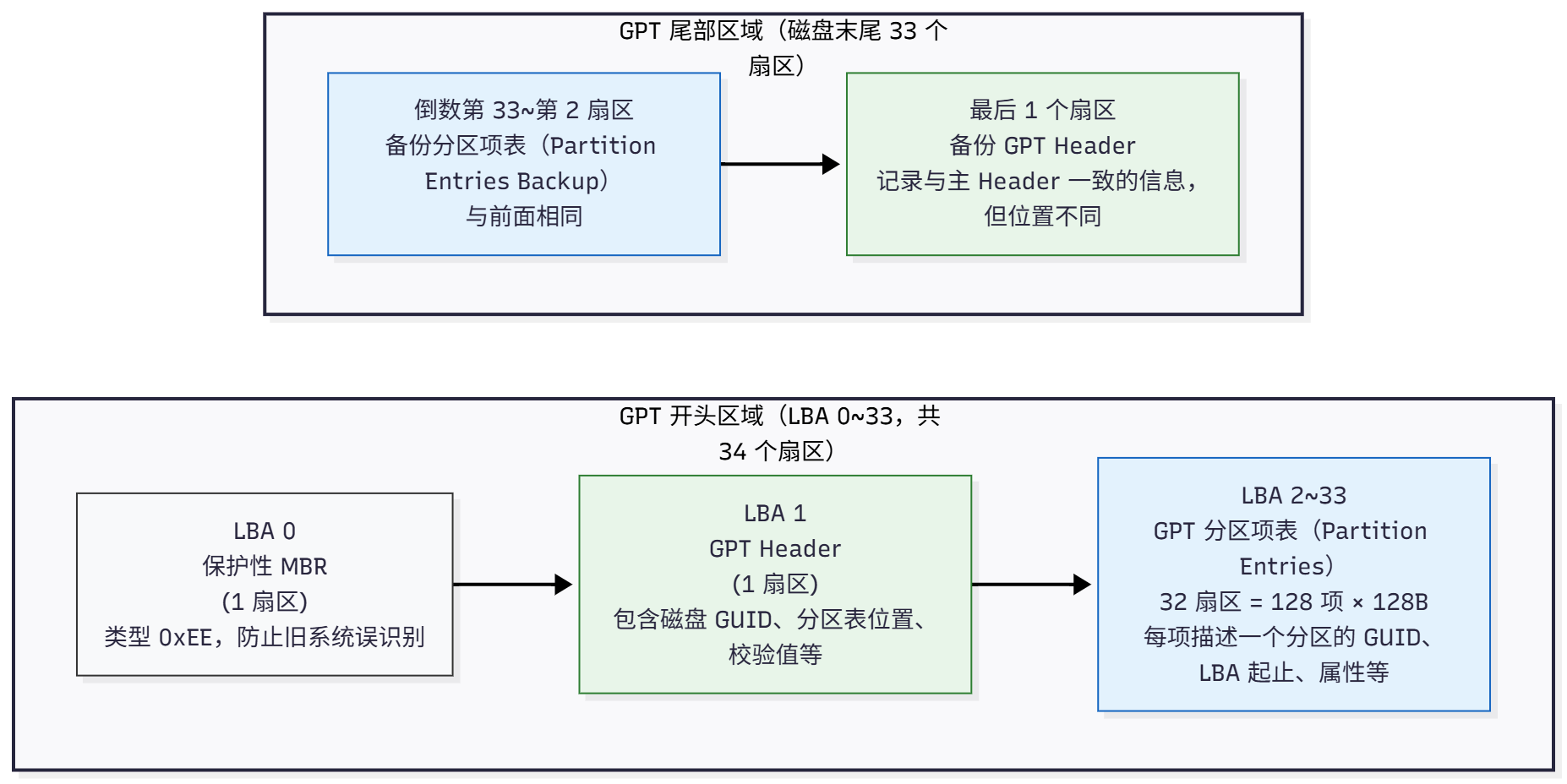
flowchart LR classDef region fill:#f8f9fa,stroke:#333,stroke-width:1px; classDef hdr fill:#e8f5e9,stroke:#2e7d32,stroke-width:1px; classDef ent fill:#e3f2fd,stroke:#1565c0,stroke-width:1px;
Command (m forhelp): n Partition type p primary (0 primary, 0 extended, 4 free) e extended (container for logical partitions) Select (default p):
Using default response p. Partition number (1-4, default 1): First sector (2048-41943039, default 2048): Last sector, +/-sectors or +/-size{K,M,G,T,P} (2048-41943039, default 41943039): +3G
Created a new partition 1 of type'Linux' and of size 3 GiB.
Command (m forhelp): p Disk /dev/sdb: 20 GiB, 21474836480 bytes, 41943040 sectors Disk model: VMware Virtual S Units: sectors of 1 * 512 = 512 bytes Sector size (logical/physical): 512 bytes / 512 bytes I/O size (minimum/optimal): 512 bytes / 512 bytes Disklabel type: dos Disk identifier: 0x9fd7e3c8
Device Boot Start End Sectors Size Id Type /dev/sdb1 2048 6293503 6291456 3G 83 Linux
Command (m forhelp): w The partition table has been altered. Calling ioctl() to re-read partition table. Syncing disks.
# 挂载全部 root@ubuntu24template:~# mount -a mount: (hint) your fstab has been modified, but systemd still uses the old version; use 'systemctl daemon-reload' to reload. root@ubuntu24template:~# systemctl daemon-reload root@ubuntu24template:~#
root@ubuntu24template:~# gdisk /dev/sdc GPT fdisk (gdisk) version 1.0.10
Partition table scan: MBR: not present BSD: not present APM: not present GPT: not present
Creating new GPT entries in memory.
Command (? forhelp): p Disk /dev/sdc: 41943040 sectors, 20.0 GiB Model: VMware Virtual S Sector size (logical/physical): 512/512 bytes Disk identifier (GUID): 5245C6ED-5E19-43EE-A677-ADAAB55040E0 Partition table holds up to 128 entries Main partition table begins at sector 2 and ends at sector 33 First usable sector is 34, last usable sector is 41943006 Partitions will be aligned on 2048-sector boundaries Total free space is 41942973 sectors (20.0 GiB)
[root@centos9 ~]# vgs VG #PV #LV #SN Attr VSize VFree cs 1 2 0 wz--n- <19.00g 0 vg1 2 1 0 wz--n- 39.99g 9.99g [root@centos9 ~]# vgscan Found volume group "vg1" using metadata type lvm2 Found volume group "cs" using metadata type lvm2 [root@centos9 ~]# vgdisplay --- Volume group --- VG Name vg1 System ID Format lvm2 Metadata Areas 2 Metadata Sequence No 2 VG Access read/write VG Status resizable MAX LV 0 Cur LV 1 Open LV 0 Max PV 0 Cur PV 2 Act PV 2 VG Size 39.99 GiB PE Size 4.00 MiB Total PE 10238 Alloc PE / Size 7680 / 30.00 GiB Free PE / Size 2558 / 9.99 GiB VG UUID X9duoj-3Ev2-1HL3-XOX7-Wt7g-YPWy-kn80yf --- Volume group --- VG Name cs System ID Format lvm2 Metadata Areas 1 Metadata Sequence No 3 VG Access read/write VG Status resizable MAX LV 0 Cur LV 2 Open LV 2 Max PV 0 Cur PV 1 Act PV 1 VG Size <19.00 GiB PE Size 4.00 MiB Total PE 4863 Alloc PE / Size 4863 / <19.00 GiB Free PE / Size 0 / 0 VG UUID lOJaWr-4Iid-YfK0-fQTp-LN9a-lNf1-PqL8ET [root@centos9 ~]#
[root@centos9 ~]# vgdisplay vg1 --- Volume group --- VG Name vg1 System ID Format lvm2 Metadata Areas 2 Metadata Sequence No 2 VG Access read/write VG Status resizable MAX LV 0 Cur LV 1 Open LV 1 Max PV 0 Cur PV 2 Act PV 2 VG Size 39.99 GiB PE Size 4.00 MiB Total PE 10238 Alloc PE / Size 7680 / 30.00 GiB Free PE / Size 2558 / 9.99 GiB VG UUID X9duoj-3Ev2-1HL3-XOX7-Wt7g-YPWy-kn80yf [root@centos9 ~]#
# 扩容文件系统 [root@centos9 ~]# resize2fs /dev/vg1/lv1 resize2fs 1.46.5 (30-Dec-2021) Filesystem at /dev/vg1/lv1 is mounted on /mnt/lv1; on-line resizing required old_desc_blocks = 4, new_desc_blocks = 5 The filesystem on /dev/vg1/lv1 is now 10483712 (4k) blocks long.
# 查看vg1详细信息 [root@centos9 ~]# vgdisplay vg1 --- Volume group --- VG Name vg1 System ID Format lvm2 Metadata Areas 2 Metadata Sequence No 5 VG Access read/write VG Status resizable MAX LV 0 Cur LV 1 Open LV 1 Max PV 0 Cur PV 2 Act PV 2 VG Size 39.99 GiB PE Size 4.00 MiB Total PE 10238 Alloc PE / Size 10238 / 39.99 GiB Free PE / Size 0 / 0 VG UUID X9duoj-3Ev2-1HL3-XOX7-Wt7g-YPWy-kn80yf [root@centos9 ~]#
[root@centos9 ~]# resize2fs /dev/vg1/lv1 resize2fs 1.46.5 (30-Dec-2021) Filesystem at /dev/vg1/lv1 is mounted on /mnt/lv1; on-line resizing required old_desc_blocks = 5, new_desc_blocks = 6 The filesystem on /dev/vg1/lv1 is now 10745856 (4k) blocks long.
# 创建的新文件继承了属组 [root@centos7 ~]# touch dir1/file{4..6} [root@centos7 ~]# ls -l dir1/file{4..6} -rw-r--r-- 1 root OPS 0 Oct 6 17:39 dir1/file4 -rw-r--r-- 1 root OPS 0 Oct 6 17:39 dir1/file5 -rw-r--r-- 1 root OPS 0 Oct 6 17:39 dir1/file6 [root@centos7 ~]#
3.3 SBIT
准备环境
1 2 3 4 5 6 7 8 9 10 11 12 13 14 15 16
# 新建两个用户 [root@centos7 ~]# useradd alice [root@centos7 ~]# useradd bob [root@centos7 ~]#
# 加入同一个IT组 [root@centos7 ~]# gpasswd -a alice IT Adding user alice to group IT [root@centos7 ~]# gpasswd -a bob IT Adding user bob to group IT [root@centos7 ~]#
# ,设置组内成员可w [root@centos7 ~]# ls -ld /opt/ITshare/ drwxr-xr-x 2 root IT 6 Oct 6 17:47 /opt/ITshare/ [root@centos7 ~]# chmod g+w /opt/ITshare/ [root@centos7 ~]# ls -ld /opt/ITshare/ drwxrwxr-x 2 root IT 6 Oct 6 17:47 /opt/ITshare/ [root@centos7 ~]#
# 使用alice用户创建文件 [root@centos7 ~]# su alice [alice@centos7 root]$ cd /opt/ITshare/ [alice@centos7 ITshare]$ touch alice.txt [alice@centos7 ITshare]$
# 切换到bob,发现可以删除alice的文件 [root@centos7 ~]# su bob [bob@centos7 root]$ cd /opt/ITshare/ [bob@centos7 ITshare]$ ls -l total 0 -rw-rw-r-- 1 alice alice 0 Oct 6 17:51 alice.txt [bob@centos7 ITshare]$ [bob@centos7 ITshare]$ rm alice.txt rm: remove write-protected regular empty file ‘alice.txt’? y [bob@centos7 ITshare]$ ls -la total 0 drwxrwxr-x 2 root IT 6 Oct 6 17:52 . drwxr-xr-x. 5 root root 51 Oct 6 17:47 .. [bob@centos7 ITshare]$
# 设置SBIT权限 [root@centos7 ~]# ls -ld /opt/ITshare/ drwxrwxr-x 2 root IT 6 Oct 6 17:52 /opt/ITshare/ [root@centos7 ~]# chmod o+t /opt/ITshare/ [root@centos7 ~]# ls -ld /opt/ITshare/ drwxrwxr-t 2 root IT 6 Oct 6 17:52 /opt/ITshare/ [root@centos7 ~]#
# 切换到alice,创建新文件 [root@centos7 ~]# su alice [alice@centos7 root]$ cd /opt/ITshare/ [alice@centos7 ITshare]$ touch alice.txt [alice@centos7 ITshare]$
# 切换到bob,发现不可以删除alice的文件 [root@centos7 ~]# su bob [bob@centos7 root]$ cd /opt/ITshare/ [bob@centos7 ITshare]$ ls -l total 0 -rw-rw-r-- 1 alice alice 0 Oct 6 17:56 alice.txt [bob@centos7 ITshare]$ [bob@centos7 ITshare]$ rm alice.txt rm: remove write-protected regular empty file ‘alice.txt’? y rm: cannot remove ‘alice.txt’: Operation not permitted [bob@centos7 ITshare]$